


Reinforcement groups combine the existing reinforcement in a separate type for the concrete design. A reinforcement group is defined once and then assigned to the objects to which it should apply.
The reinforcement groups are located in the Navigator - Data in the Reinforcement category below the concrete durabilities.
List of Reinforcement Groups
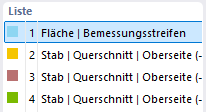
In the List section, all reinforcement groups of the model are listed with number, color, and designation. Select an entry to display its parameters in the right part of the dialog box. Using the buttons below the list, you can create new reinforcement groups or copy and delete existing ones.
Number, Name, and Assignment

The No. field shows the number of the reinforcement group. The Name is automatically generated from the reinforcement group type. Using the button to the right of the field, you can assign a user-defined designation.
In the Assigned to ... No. field, enter the numbers of the objects to which the reinforcement group should apply. The designation of the field depends on the reinforcement group type, for example 'Assigned to Design Strip No.'. Using the button to the right of the field, the objects can also be selected graphically in the work window.
Reinforcement Group Type

The reinforcement group type defines to which objects the reinforcement group applies and how the reinforcement is described. The tabs and input sections of the dialog box depend on the selected type. They are described in the following subsections.