


Nonlinear Behavior of Reinforced Concrete
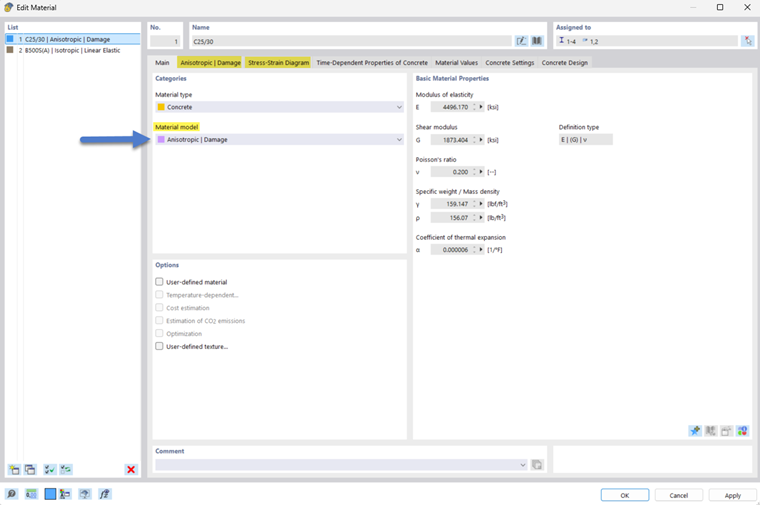
If the Nonlinear Material Behavior add-on is activated in the Base Data, the “Anisotropic | Damage” material model can be set for the concrete material. This is suitable for modeling the nonlinear behavior of reinforced concrete. Once the material model is set, two specific tabs “Anisotropic | Damage” and “Stress-Strain Diagram” appear. This is highlighted in the following image.
Parameters
The “Anisotropic | Damage” tab offers the option to enter all parameters for defining the desired material behavior. It is divided into the “General” and “Strength Parameters” sections. On the right side, the graphic schematically illustrates the set stress-strain diagram.
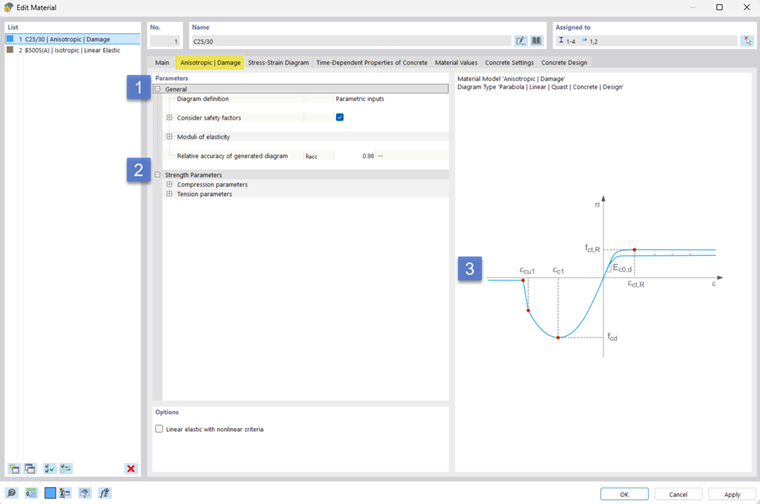
Diagram Definition
The General tab allows you to select the type of diagram definition for the stress-strain relation.
The Nonlinear Material Behavior add-on provides the options “Parametric Input” and “Stress-Strain Relations” for this purpose. For more information, the manual for RFEM 6 provides details in the chapter Nonlinear Material Behavior.
The Concrete Design add-on provides additional options. These depend on the design standard selected in the Base Data.
SLS | Deflection Values
If the material is to be used to determine the deformations in the serviceability limit state, the material “SLS | (Average) Values for Deflection” can be applied. The input dialog box for the “General” section is then as shown in the following image.
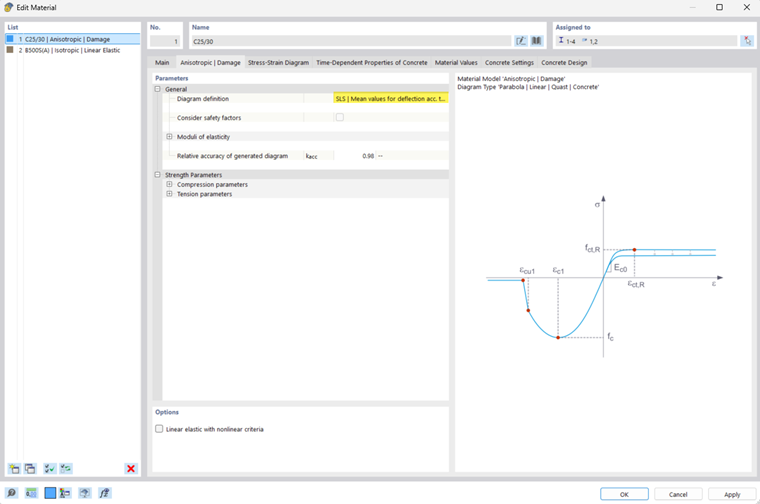
Since the SLS can be calculated using characteristic material properties, the “Consider safety factors” option is inactive and cannot be edited.
ULS | Design Values
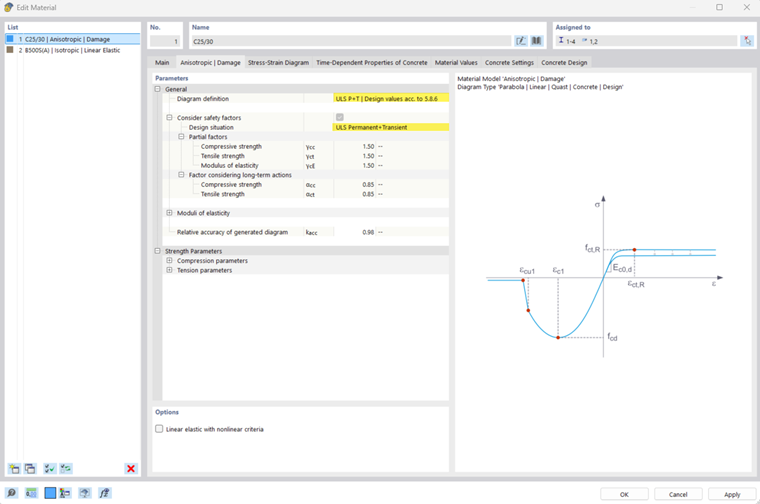
If the material is to be used in the determination of internal forces for design checks in the ultimate limit state, the material “ULS | Design Values” can be applied. The option “Consider safety factors” is active by default and can be edited if necessary.
For the ULS, a distinction is made between the design situations “Permanent and temporary” (ULS P+T) and “Accidental” (ULS ACC). Depending on the selection, the corresponding safety factors are adopted according to the design standard.
The input dialog box for the “General” section is shown in the following series of images.
Relative Accuracy of Generated Diagram
This setting controls the number of definition points in the stress-strain relation diagram. A value between 0.0 and 1.0 can be entered, with 1.0 representing the highest number of points for the diagram definition and thus the highest accuracy.
Strength Parameters
Finally, the Strength Parameters section lists the strength parameters for the compression area and tensile area for the selected diagram definition. The following image shows this section.
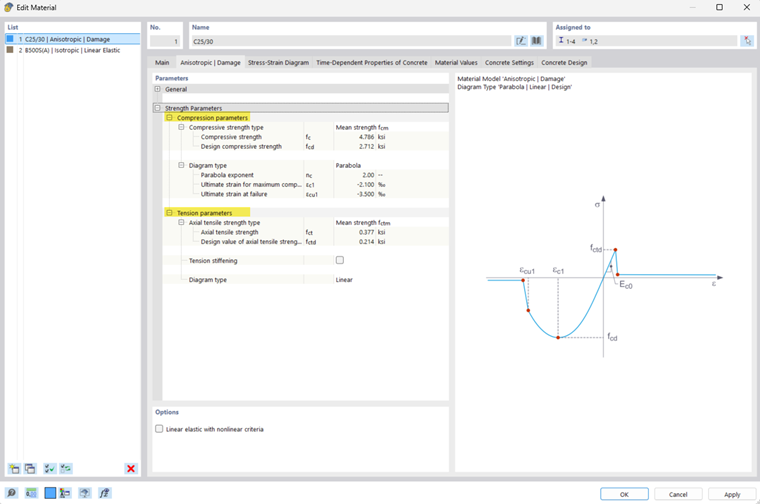
- For the compression area, you can select between the diagram types “Parabola” and “Parabola-Rectangle.”
- For the tensile area, you have the option of using tension stiffening.
Tension Stiffening
Three methods for modeling concrete tension strength are provided for consideration of tension stiffening. In the approaches provided, the contribution of concrete to tension strength between cracks is based on a defined stress-strain diagram for concrete in the tensile area. The following approaches are available for selection.
- Quast
- Modified Quast
- Hsu and Mo
The following series of images shows the input dialog box for selecting the tension stiffening method.
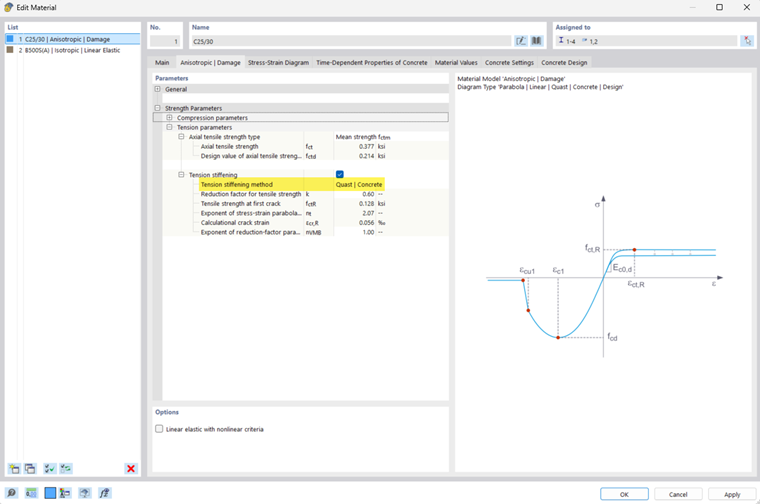
Further information can be found in the chapter on theoretical principles of Tension Stiffening.
Stress-Strain Diagram
This section shows the stress-strain diagram that results from the previously mentioned input parameters and is incorporated into the finite element analysis for representing the concrete behavior.
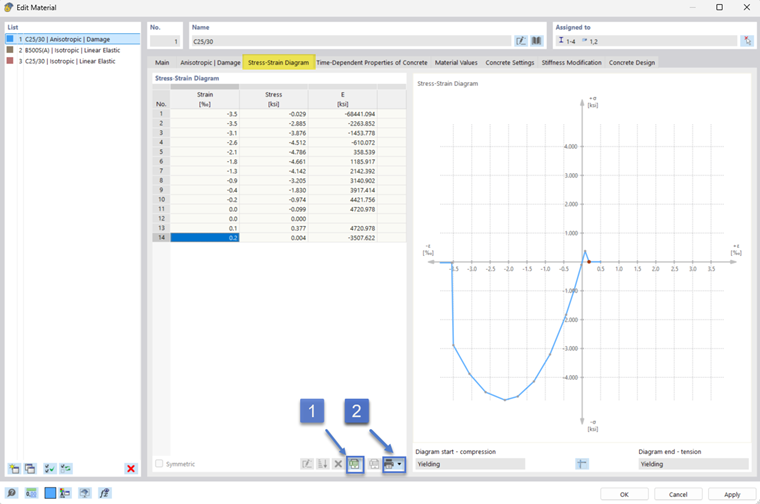
- The table data of the stress-strain diagram can be exported to Excel. See (1) in the image above.
- The diagram can be printed as a graphic. See (2) in the image above.
- The import of the tabular listing of the stress-strain diagram key values (see (3)) is available for the diagram definition "Stress-Strain Diagram" selected in the "Anisotropic | Damage" tab. For this type of definition, the table entries are editable.