


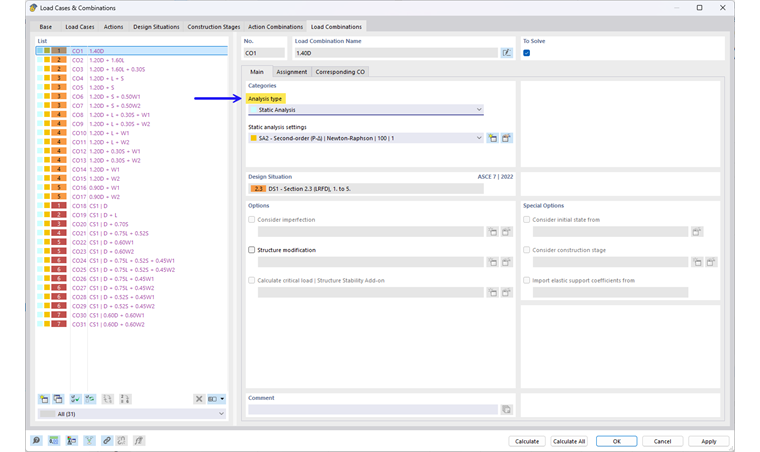
The “Analysis Type” is preset according to the load case category.
Static Analysis
The default setting for the analysis type is “Static Analysis,” as shown in the following image.
Structural Analysis | Creep and Shrinkage (Linear)
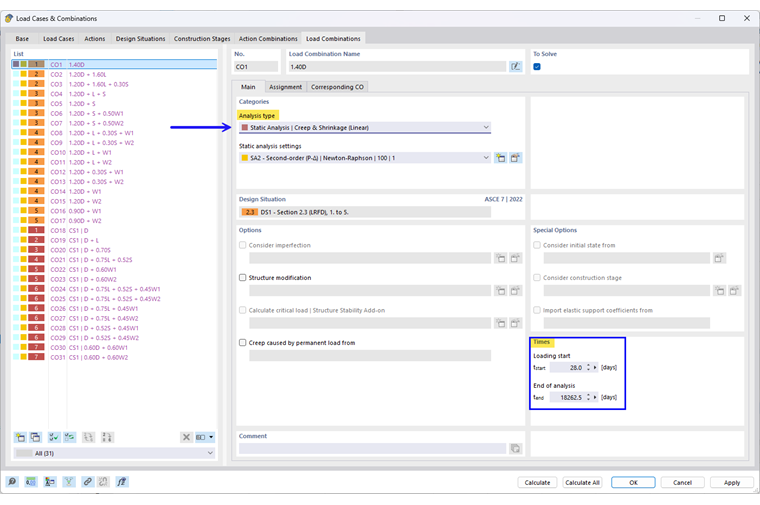
If the Nonlinear Material Behavior add-on is activated for the Concrete Design add-on, the “Static Analysis | Creep & Shrinkage (Linear)” is available. This analysis type extends the structural analysis to include creep and shrinkage.
Creep and shrinkage are already included in the finite element analysis. For this, you only need to enter the start and end of the load.
For background information on how creep and shrinkage are considered in this analysis type, refer to the chapter Time-Dependent Behavior.
Creep Due to Permanent Load
This option to define the creep-inducing permanent load is available especially for the analysis with linear creep. This is highlighted in the following image.
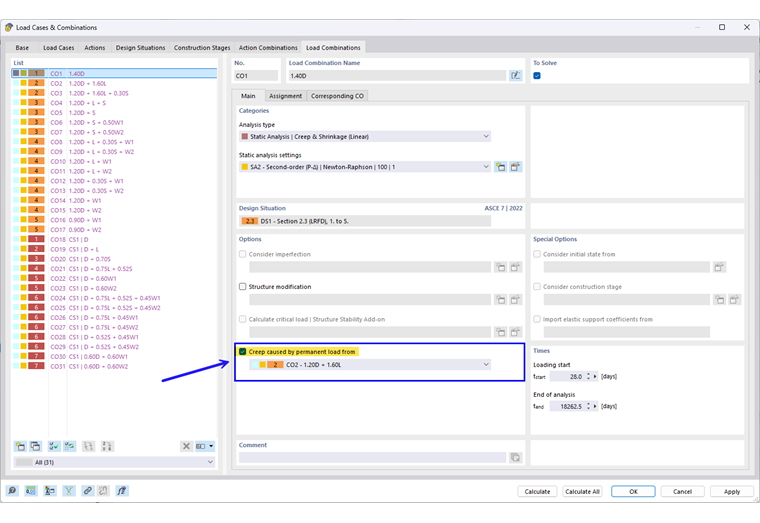
This allows you to calculate the creep for the permanently acting component of the current load combination, while the remaining load is calculated without considering the creep.
The load level is taken from the load combination assigned in this option in order to carry out the analysis considering creep in a first partial calculation. The analysis is then continued without the creep for the other load components of the current combination that exceed the permanent level and are not to be considered as creep-inducing.
Combination Wizard for Analysis Type and Permanent Load
The analysis type and the creep-inducing load can be set manually, as shown in the section above. However, it is also possible to define these settings in the combination wizard so that the desired settings can be taken into account when generating the combinations.
Analysis Type
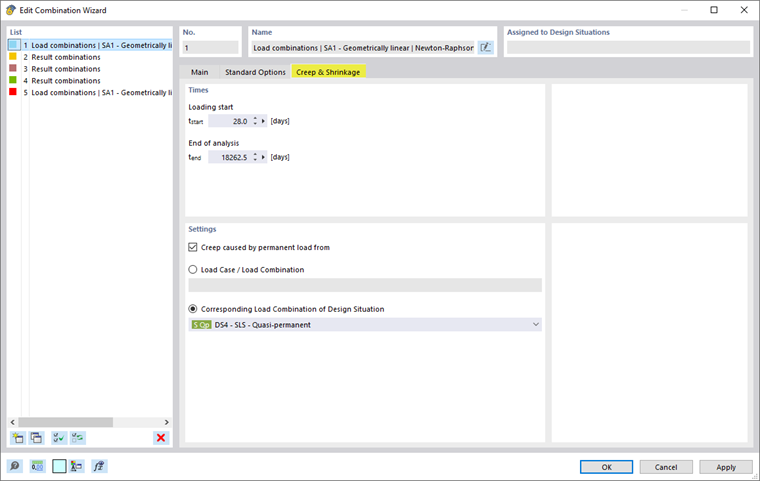
In the combination wizard, the type of structural analysis can be selected in the main tab, as shown in the second image in the following series of images. If the “Static Analysis | Creep & Shrinkage (Linear)” type is set, the additional tab “Creep & Shrinkage” appears. This is divided into the input areas for specifying the times and the creep-inducing permanent load. This is shown in the first image of the series of images displayed below.
Creep Caused by Permanent Load from
If Creep caused by permanent load from (1) is selected in the “Creep & Shrinkage” section under Settings, the two options for defining the creep-inducing load become available.
You can either set a specific load case or a specific load combination (2). As an alternative, you can select a design situation. This assigns the corresponding load combination of the selected design situation to a combination (3).
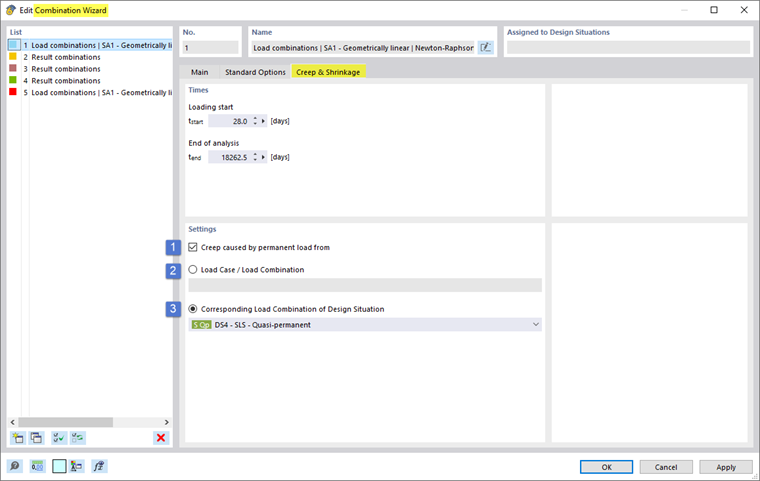
If you select the “Corresponding load combination of design situation” option, the corresponding load combination of the specified design situation is automatically set as the permanent load for each of the generated load combinations.
This is shown in the following series of images as an example for the case where the “BS 4 – SLS – quasi-permanent” design situation was selected.
- All load combinations generated from the current combination wizard that do not belong to Design Situation 4 selected as permanent load are set to the corresponding CO of Design Situation 4, as shown in Images 1 and 2.
- For all load cases generated from the current combination wizard and belonging to Design Situation 4 selected as permanent load, the “Creep caused by permanent load from” option is not activated. This is because these load cases themselves correspond to the permanent load level. This is shown in Image 3 of the following series of images.
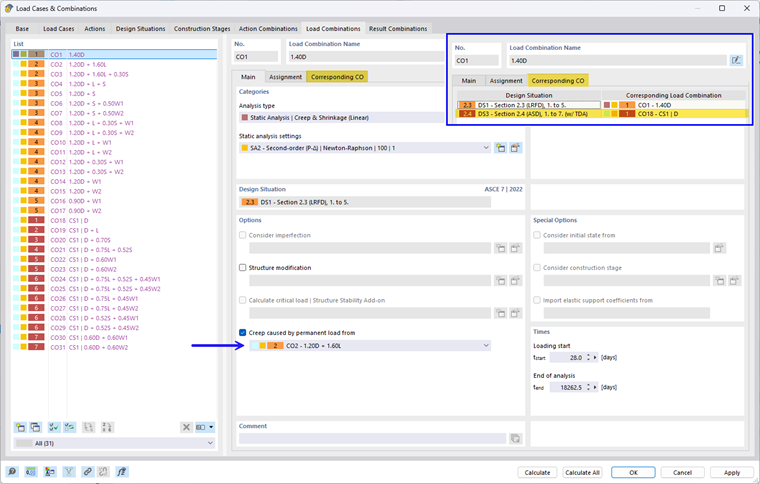
If the corresponding load combinations are not entered, you can activate them by selecting the “Automatically assign corresponding load combinations” option in the “Load Cases and Combinations” main input dialog box. Alternatively, you can define the corresponding load combinations manually.