


The object snap facilitates modeling when placing lines, elements, and parts. In addition to points, you can use various snap points on objects.
List
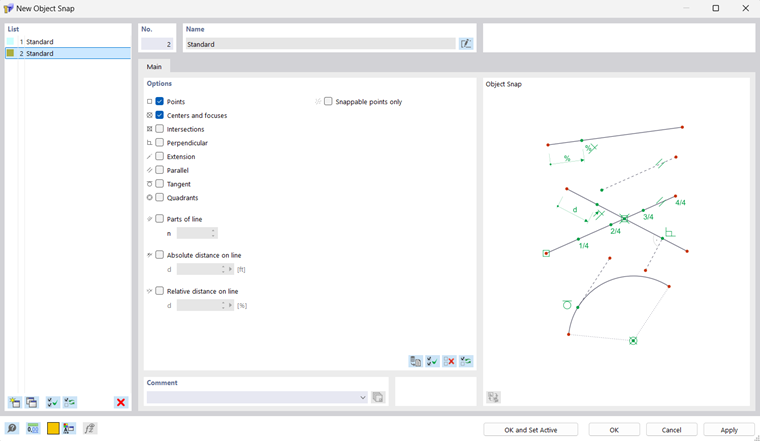
The "List" manages all object snaps of the model. The List of Object Types table describes the functions with which you can create, copy, or delete objects of a list.
Options
As "Standard", points, centers, and focuses are activated as snap points. For example, when placing a new line approaching an object with the pointer, the assigned symbols appear.
You can use the check boxes to control the snap points that are to be used:
| Points | Free points and points of lines and elements |
| Centers and focuses | When moving the pointer near the center of a line or the focus of a curve, it snaps into place. |
| Intersections | Intersection points of two lines or two elements that do not have a common point |
| Perpendicular | Perpendicular connection to a line or an element |
| Extension | Connection to the straight line of a line that was preselected (briefly touched by the pointer) |
| Parallel | Placing a parallel line: After setting the starting point, move the pointer over a pattern line. As soon as the pointer approaches a possible end point of the new line so that it is parallel to the pattern, the parallel symbol appears on the lines. |
| Tangent | Touch point of a line or an element on the circular arc |
| Quadrants | Locations for the division of a circle in quarter points |
| Parts | Locations for the division of lines: When you move the pointer over a line, it snaps on the defined "n" divisions. On the cursor, the partition is displayed as a fraction. |
| Distance | Locations for the division of lines in absolute or relative distance: When you move the pointer over a line, it snaps on the defined "d" distances from the line start and line end. |
| Snappable points only | Placing points on already defined objects only, not in the work plane |
CAD Toolbar
In the CAD toolbar below the tables, you can switch the object snap on and off, as well as individual snap functions.
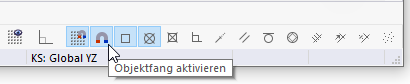
The buttons have the following functions:

|
Turn the snap function on and off for grid points |

|
Turn the object snap on and off |

|
Snap to points and control points |

|
Snap to centers and focuses |

|
Snap to intersections |

|
Snap to perpendicular points |

|
Snap to extensions |

|
Snap to parallel lines |

|
Snap to tangents |

|
Snap to circle quadrants |

|
Snap to division points of lines |

|
Snap to locations of lines with an absolute distance |

|
Snap to locations of lines with a relative distance |

|
Snap to snappable points only |