


Subpanels are required for the classification and calculation of the effective cross-sectional area of thin-walled steel and aluminum cross-sections.
By default, individual subpanels and their properties are automatically derived from the cross-section geometry. If the “Enable manual input of subpanels” option is activated, you can create new subpanels, modify existing ones, and adjust their properties. If the option is deactivated, the subpanels are automatically determined again according to the standard-compliant requirements.
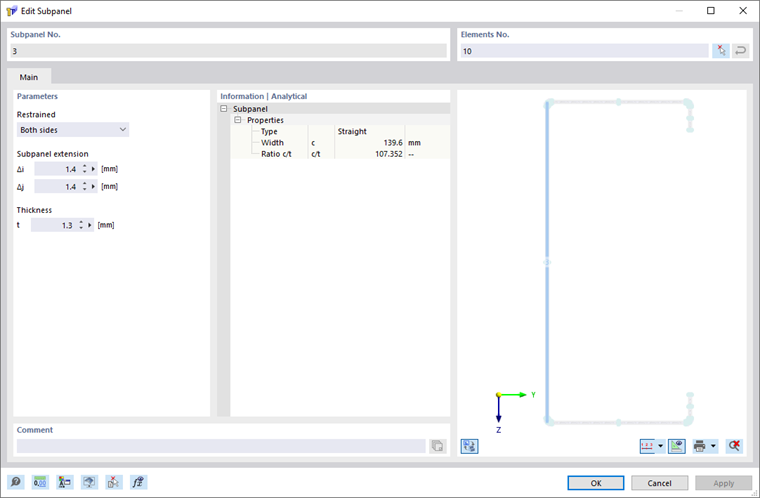
The number of a subpanel is assigned automatically, but can be changed. The numbering sequence is arbitrary; consecutive numbering is not required.
Elements No.
The “Elements No.” section lists the elements assigned to the subpanel.
During automatic determination, adjacent elements are combined into a subpanel, provided there are no intermediate supports. Whether an adjacent element is considered a support depends on the "Tolerance for straight subpanels" setting.
In the case of manual definition, the corresponding elements can be entered directly or selected graphically in the workspace using the
 button. Multiple elements can be assigned to a subpanel, provided they are continuous.
Supports
For each individual subpanel, a distinction is made between supported and free edges.
The support conditions are determined based on the geometry of the adjacent elements. Whether an adjacent element is considered as support depends on the “Tolerance for straight subpanels” setting.
Subpanel Extension
For the start and end of a subpanel, a distance from the component edge can be specified. This value affects the width of the subpanel.
Positive values increase the width of the subpanel; negative values decrease it.
Thickness
During automatic calculation, the thickness of the subpanel is set to the smallest thickness of the associated elements.
Information | Analytical
This section contains the most important properties of the subpanel, such as type, width, and c/t ratio.