


In the weld stress configuration, you can select the weld stresses to be calculated and output. You can open the weld stress configuration in the Navigator – Data using the Stresses entry.
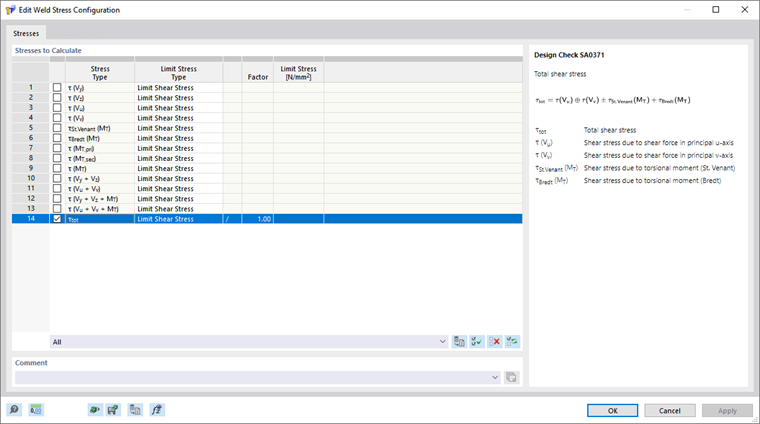
Stresses to Calculate
You can select the stresses to be calculated in the list. When you select a check box, the corresponding stress is calculated.
A description of the selected stress is displayed to the right of the list.
Limit Stress
For each stress, you can select a limit stress type in the table. The stress ratio is calculated from the ratio of the existing stress to the limit stress.
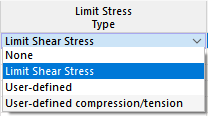
If you want to increase or reduce the limit stress for a stress type, you can scale it accordingly in the "Factor" column. If you select the "/" option, the stress is divided by the factor multiplied by "*".
None
For the "None" type of limit stress, the calculation of the stress ratio is omitted.
Limit Shear Stress
The limit shear stress indicates the allowable shear stress due to shear and torsion. The limit shear stress is determined in compliance with EN 1993-1-8, according to the following formula:
|
fu |
Tensile strength of the weaker of the joined members |
|
βw |
Correlation factor according to EN 1993-1-8, Table 4.1 |
|
γM2 |
Partial safety factor for resistance of welds |
User-Defined
You can use the "User-defined" limit stress type to adjust the limit stress manually. The limit stress can be specified in the "User-defined limit stress" column.
User-Defined Compression/Tension
The "User-defined compression/tension" limit stress type allows you to specify sign-dependent limit stresses for certain stress components.