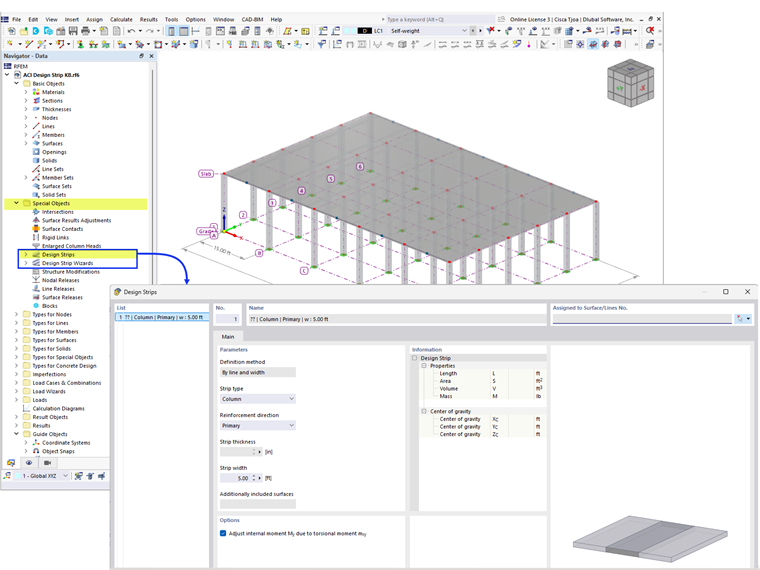
Design strips are basically manually or automatically generated result members with extended features. They allow for the simplified concrete design of planar surfaces using member elements. This approach is particularly common in the USA and Canada. The method described in ACI 318-19 [1], Section 8.4.1, can be used for bending stresses on reinforced concrete slabs restrained on two sides to perform the design with an averaged distribution of moments.
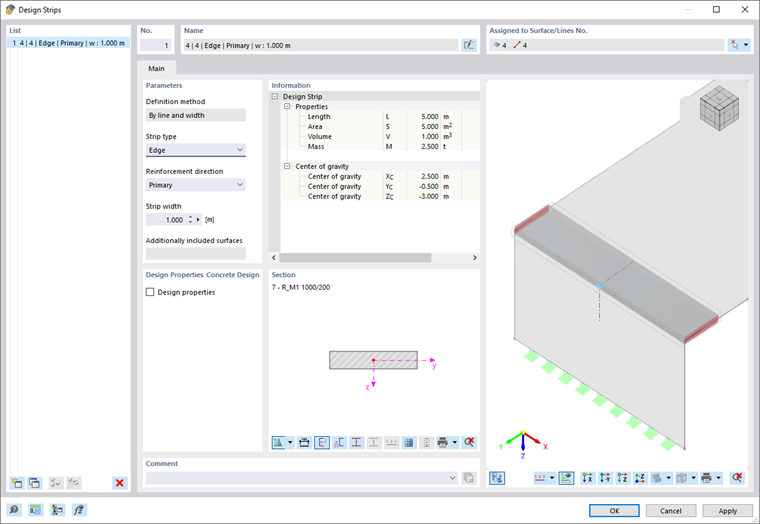
Assigned to Surface/Line No.
Define the surface or line for which the design strip is to be generated. The list button provides two options that allow you to select the objects graphically in the working window.

Parameters
The “Definition method” for a design strip is currently controlled by the line of the model and its width. The cross-section of the strip is generated from the surface thickness and the strip width.
To arrange the design strip appropriately on the line, select one of the following options from the “Strip type” list:
- Column – Centered arrangement on column rows (for design of column moments of continuous slabs)
- Center – Arrangement in the field between column rows (for design of field moments); adjacent to columns or edge strips
- Edge – Cccentric arrangement along the boundary line of the surface
These designations are only used to describe the strips. They have no influence on the calculation.
Specify which “Reinforcement direction” is relevant for the design strip:
- Primary – Main reinforcement
- Secondary – Transverse reinforcement
This designation is also only descriptive.
Specify the “Strip width” to be used for integrating the internal forces in the result member. You can use the Design Strip Wizard to generate strip widths according to spacing rules.
Design Properties
If the Concrete Design add-on is activated in the model's Base Data, you can specify the type and arrangement of the reinforcement in the “Reinforcement” tab.
Information
In addition to the geometric properties of the design strip, this section displays information on solids, mass, and center of gravity, which are derived from the material properties.
Cross-Section
The cross-section of the result member is displayed for information purposes. The height of the solid rectangular profile is determined by the plate thickness, and the width by the strip width.