


A surface contact describes the connection between parallel surfaces. It is a coupling of surfaces by which you can control the transfer of forces without creating a contact solid, as was the case in RFEM 5. This allows you to connect surfaces whose contact is, for example, only effective for compressive forces.
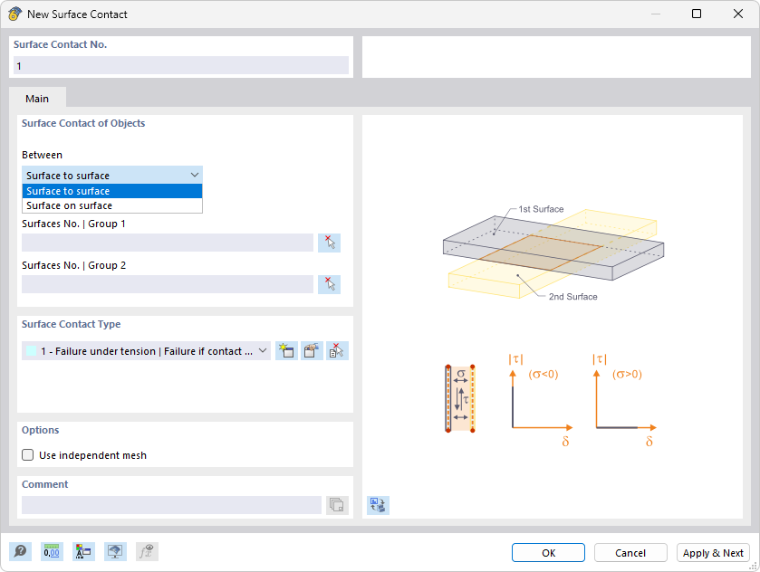
Surface Contact Between Objects
From the “Between” list, select the geometric relationship between the surfaces:
- Surface to surface: The two parallel groups of surfaces are spaced apart from each other.
- Surface on surface: The groups of surfaces lie directly on top of each other with no space between them (that is, in the same planar configuration).
Enter the numbers of the surfaces that have contact. Define one of the surfaces as "Group 1" and the parallel surface as "Group 2". Use the
 button to select the surfaces graphically. Each group may also consist of several surfaces.
Surface contacts are currently possible for planar surfaces only.
Surface Contact Type
The surface contact type controls the forces that are transferred between both surfaces. You can select the type in the list or redefine it using the
 button (see the chapter Surface Contact Types).
Options
The “Use independent mesh” check box allows for the generation of specific FE meshes for the two surfaces, each with its own integrated objects (see the chapter Mesh Settings).