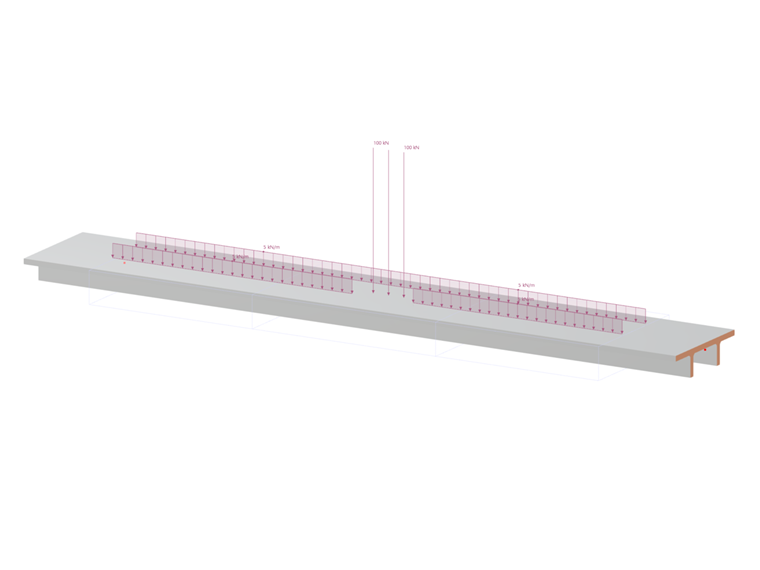
The load wizard for load models allows you to compile different loads in a load model and apply them as a load arrangement.
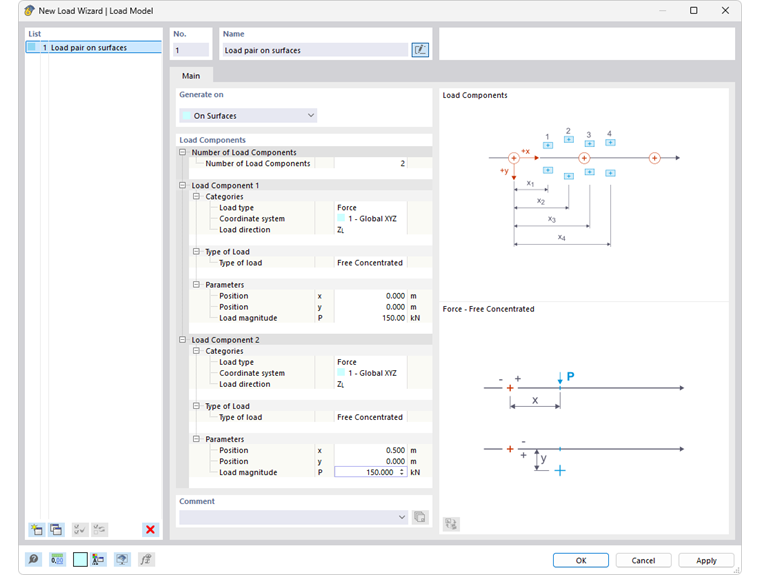
Load models are required to apply moving loads to surfaces and members with the load wizard Moving loads.
If different moving loads move parallel or offset, create another load model with the button
 at the bottom of the 'List'. This allows you to control the movements of the loads individually in a set of movements.
Name
You can assign a label to the load model, which facilitates the assignment for the moving loads.
With the button
 , you have access to a library with many predefined load models in the Dlubal Center. Your user-defined load models are also stored there.
Generation on
Select the objects on which the loads of the load model are to be generated:
- On surfaces
- On members
Load components
In this section, you can define the load parameters. The input options are adjusted to the load type and explained in the dialog graphic; they also differ for surfaces and for members.
Number of load components
Specify how many loads are present in the load position. For each additional component of this "load block", a category is added. With the load components, you can describe the moving load using forces and moments.
Load component - Categories
These categories control which parameters you can define in the subsequent steps.
Load type
The following options are available in the list:
- Force: The load is a directed quantity.
- Moment: The load is a product of force and lever arm.
Coordinate system
If the load does not refer to the global coordinate system XYZ, you can select a user-defined coordinate system from the list or create a new one.
Load direction
Define the direction in which the load acts in the list. Depending on the coordinate system, the global axes X, Y, Z or the user-defined axes U, V, W are available for selection. The load can refer to the true length (index 'L') or the projected length (index 'P') of lines.
Load component - Load type
Various options are available in the list with which you can map the arrangement of the load.
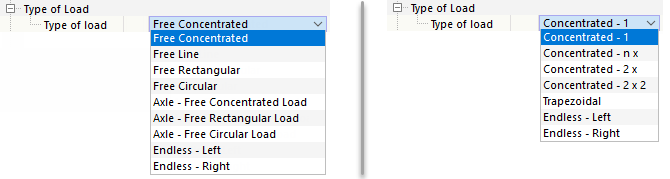
The load types are briefly described in the following tables. You can then specify the parameters in the next category.
Load types for surfaces
| Load type | Load symbol | Description |
|---|---|---|
| Free single load (concentrated force, concentrated moment) | Specify the load magnitude 'P' or 'M' as well as the distance of the load 'x' along and 'y' transversely to the reference point of the load position. | |
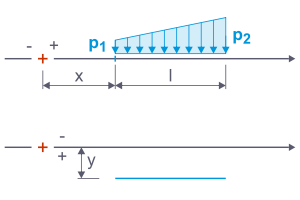
| Free line load (uniformly distributed load, trapezoidal load) | Specify the forces 'p1' and 'p2', the distance 'x' and 'y', and the length 'l' of the line load. | |
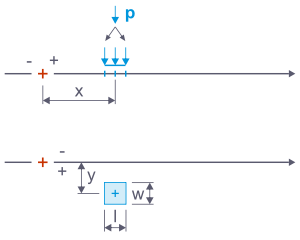
| Free rectangular load (surface block load) | Specify the distance 'x' and 'y' as well as the force 'P'. This is converted into a surface load acting on the width 'w' and length 'l' to be defined. | |
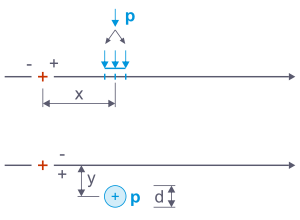
| Free circular load (surface round load) | Specify the distance 'x' and 'y' as well as the force 'P'. This is converted into a circular surface load acting on the diameter 'd' to be defined. | |
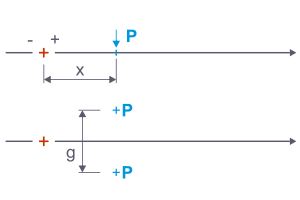
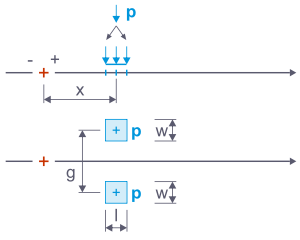
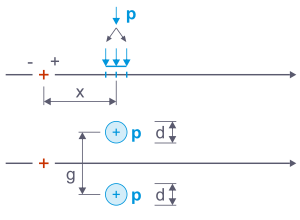
| Axle - Free single load (force pair, moment pair) | The load 'P' or 'M' is distributed to two single loads at the distance of the track gauge 'g'. Specify the distance 'x' to the reference point of the load position. | |
| Axle - Free rectangular load (block load pair) | The load 'P' is distributed to two surface loads at the distance of the track gauge 'g'. These act on the width 'w' and length 'l' (for example, the wheel contact area). | |
| Axle - Free circular load (round load pair) | The load 'P' is distributed to two surface loads at the distance of the track gauge 'g'. These act on a circular area with the diameter 'd' to be defined. | |
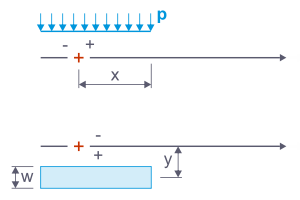
| Infinite - Left (uniform surface load) | For each load position, a constant load is applied that acts to the beginning of the line set. Specify the load magnitude 'p', the width 'w', and the distance 'x' of the right load edge to the load step reference point. With the distance 'y', you can offset the load transversely to the moving line. | |
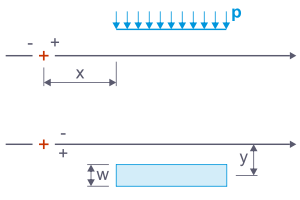
| Infinite - Right (uniform surface load) | For each load position, a constant load is applied that acts to the end of the line set. In this case, specify the distance 'x' of the left load edge to the load step reference point. |
Load types for members
| Load type | Load symbol | Description |
|---|---|---|
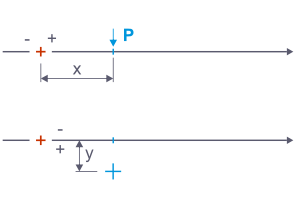
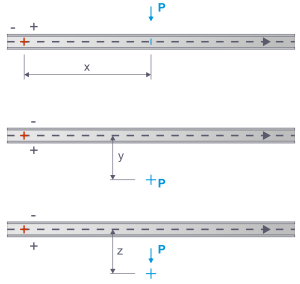
| Punctual - 1 (concentrated force, concentrated moment) | Specify the load magnitude 'P' or 'M', the distance 'x' of the load along to the reference point of the load position, and the eccentricities 'y' and 'z' transversely to the moving line. | |
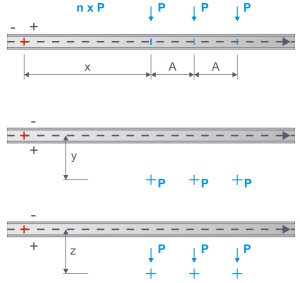
| Punctual - n x (concentrated forces, concentrated moments) | Equally large single loads act at a constant distance from each other. Specify the load magnitude, the distance 'x' of the first load to the reference point of the load position, the distance 'A' of the loads from each other, and the eccentricities 'y' and 'z' transversely to the moving line. | |
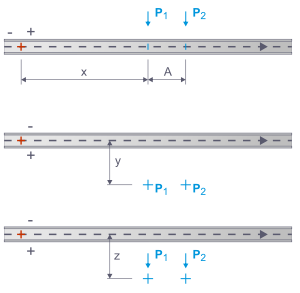
| Punctual - 2 x (force pair, moment pair) | Two single loads of different magnitude move along the member. Specify the load magnitude, the distance 'x' of the first load to the reference point of the load position, the distance 'A' between the loads, and the eccentricities 'y' and 'z' transversely to the moving line. | |
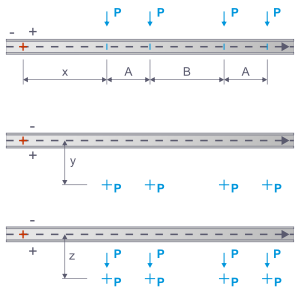
| Punctual - 2 x 2 (force pair, moment pair) | Two load pairs with equally large single loads move along the member. Specify the load magnitude, the distance 'x' of the first load to the reference point of the load position, the distances 'A' between the loads of a load pair and 'B' between the load pairs, and the eccentricities 'y' and 'z' transversely to the moving line. | |
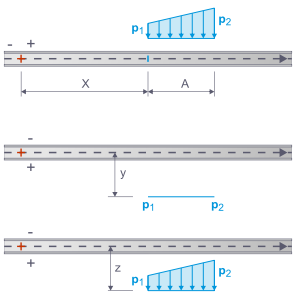
| Trapezoidal (uniformly distributed load, trapezoidal load) | Specify the forces 'p1' and 'p2', the distance 'x' to the reference point of the load position, the length 'A' of the distributed load, and the eccentricities 'y' and 'z' transversely to the moving line. | |
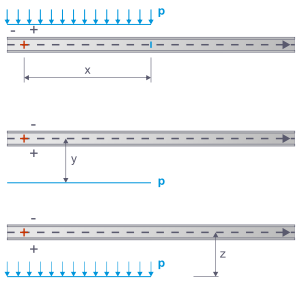
| Infinite - Left (uniformly distributed load) | For each load position, a constant load is applied that acts to the beginning of the member or member set. Specify the load magnitude 'p' and the distance 'x' of the right load edge to the load step reference point. With the eccentricities 'y' and 'z', you can offset the load transversely to the moving line. | |
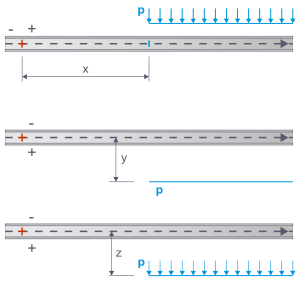
| Infinite - Right (uniformly distributed load) | For each load position, a constant load is applied that acts to the end of the member or member set. Specify the load magnitude 'p' and the distance 'x' of the left load edge to the load step reference point. With the eccentricities 'y' and 'z', you can offset the load transversely to the moving line. |
Load component - Parameters
The parameters are adjusted to the load type you previously defined. The meaning of the parameters is symbolically represented in the graphic area on the right.
Position x
The location x describes the distance of the load from the load step reference point along the moving line. This reference point is symbolised by a red cross in the sketch.
Position y / Eccentricity y
This input allows you to place loads next to the moving line. A positive value arranges the load to the right of the moving line in the viewing direction, a negative value to the left.
Eccentricity z
This input allows you to place member loads below or above the moving line. A positive value arranges the load on the side of the positive member axis z.
Track gauge g
For axle loads, you can specify the center distance of the load pair according to the sketch.
Load magnitude P / M / p
For these parameters, you can specify the magnitudes of the force P or the moment M. For line and distributed loads, enter the load magnitudes p1 at the line start and p2 at the line end. If the two values differ, a trapezoidal load is present.
Width b
For rectangular loads, you can define the load width. It represents the dimension of the load contact area transversely to the moving direction.
If an infinite load is present, the width of the lane on which the uniform surface load acts is to be specified in this column.
Length l
Here, you can specify the length of the load contact area in the direction of the moving direction or the length of the line load.
The geometric conditions are taken into account when using offset and bumper (see chapter Moving loads ): The surfaces receive only proportional loads from the contact areas.
Saving load model in Dlubal Center
You can save a load model as a template to use it for other projects as well.
Proceed as follows:
- Click the button
 at the bottom of the load model dialog (marked in the image New Load Wizard | Load Model).
 - The 'Save Load Model' window appears with the suggested storage folder Documents → Dlubal Software → Load Models.
- Define a file name and then confirm with the Save button.
User-defined load models are added in the Dlubal Center in the Load Models category. Under the entry Owner → User-Defined, you can select the appropriate load model there and use it for the moving load.
Alternatively, use the button
 at the bottom of the dialog New Load Wizard | Load Model to import the load model from a file.