Material models
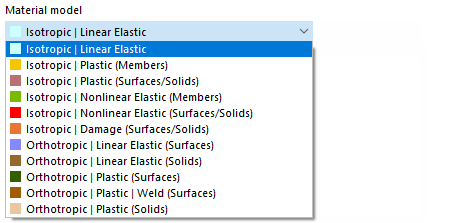
If the non-linear material behavior Analysis Add-on Non-linear Material Behavior is activated (license required) in the Model Basic Settings, additional options become available in the list of material models alongside 'Isotropic | Linear Elastic' and 'Orthotropic | Linear Elastic'.
Calculation Methods
When using a non-linear material model, an iterative calculation is always performed. Depending on the material model, a different relationship between stresses and strains is defined.
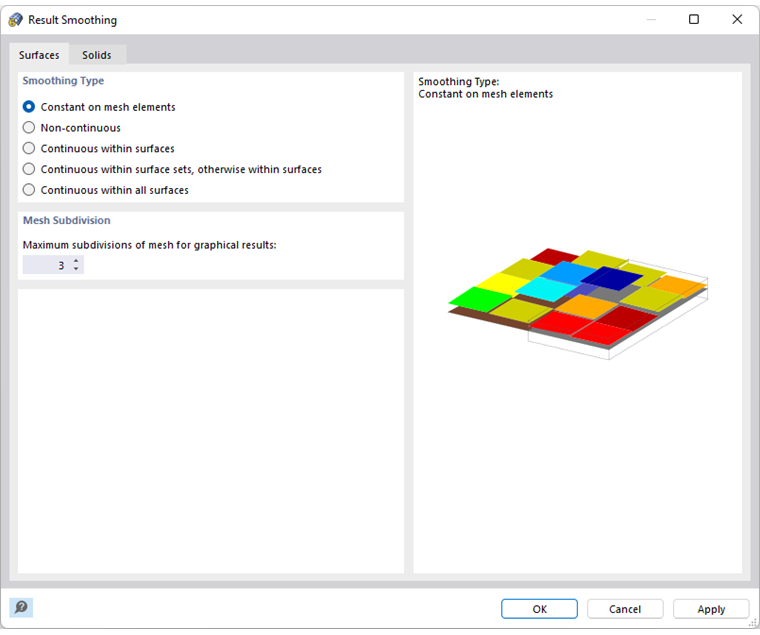
The stiffness of the finite elements is adjusted throughout the iterations until the stress-strain relationship is satisfied. The adjustment is always made for an entire surface or volume element. Therefore, the type of smoothing Constant in Mesh Elements should always be used when evaluating the stresses.
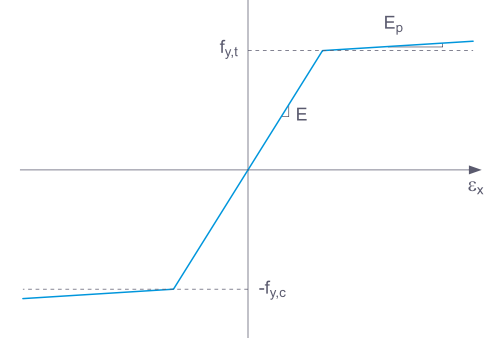
Some material models in RFEM are labeled as 'plastic,' while others are 'non-linear elastic'. When a component with a non-linear elastic material is unloaded, the strain returns along the same path. No strain remains upon complete unloading.
Upon unloading a component with a plastic material model, a strain remains after complete unloading.
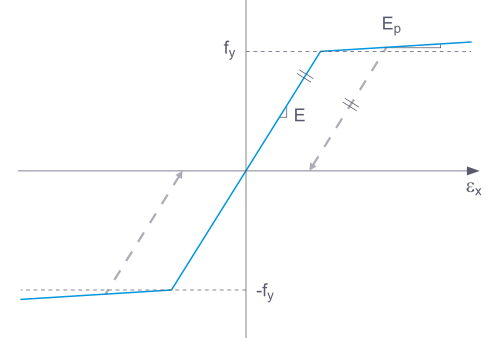
The process of loading and unloading can be simulated with the Construction Stages Analysis Add-on.
Background information on non-linear material models can be found in the technical article Flow Laws in the Material Model Isotropic Non-linear Elastic.
The internal forces in plates with non-linear material result from the numerical integration of the stresses over the plate thickness. To set the integration method for the thickness, check the option Specify Integration Method in the 'Edit Thickness' dialog. The following integration methods are then available for selection:
- Gauss-Lobatto Quadrature
- Simpson's Rule
- Trapezoidal Rule
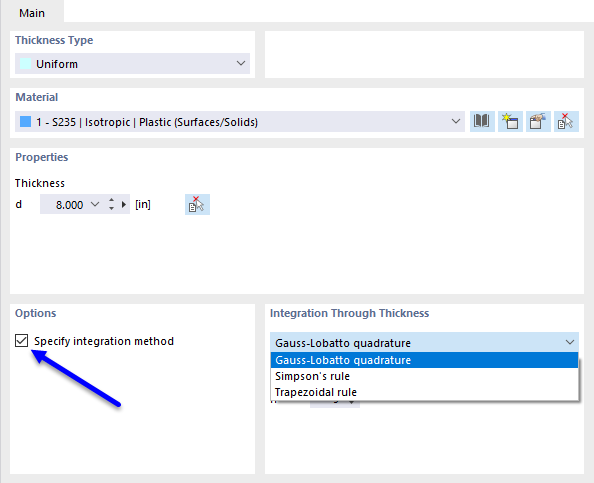
Furthermore, you can provide the 'Number of Integration Points' across the plate thickness from 3 to 99.
Isotropic Plastic (Members)
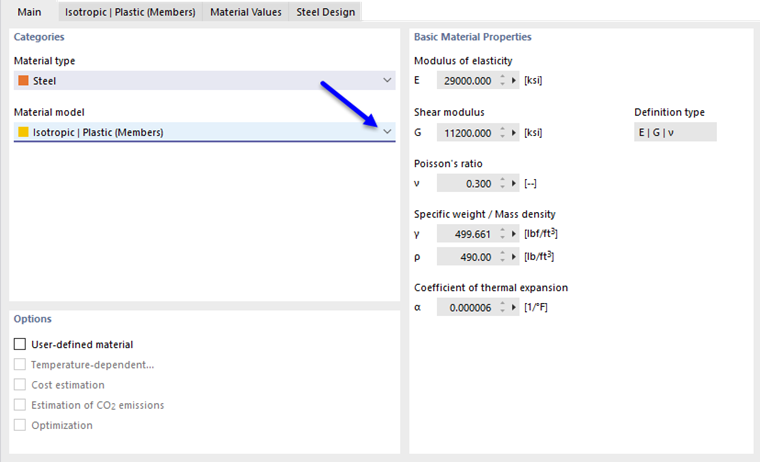
If you select Isotropic | Plastic (Members) in the 'Material Model' dropdown list, the register for entering the non-linear material parameters becomes active.
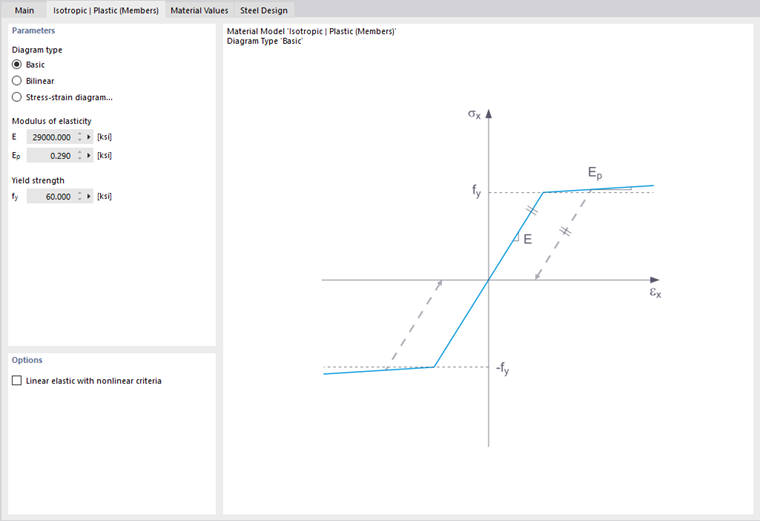
In this register, you define the stress-strain diagram. The following options are available:
- Standard
- Bilinear
- Diagram
If 'Standard' is selected, RFEM uses a bilinear material model. The values for the modulus of elasticity E and the yield strength fy are taken from the material database. For numerical reasons, the branch is not exactly horizontal but has a slight increase Ep.
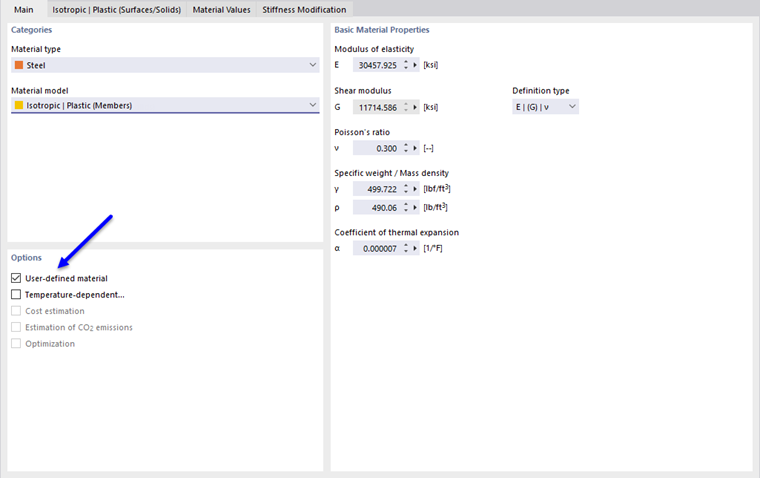
To change the values for the yield strength and the modulus of elasticity, activate the Custom Material checkbox in the 'Basic' register.
With the bilinear definition, you can also enter the value for Ep.
To define more complex relationships between stress and strain, use the Stress-Strain Diagram. When you select this option, the 'Stress-Strain Diagram' tab appears.
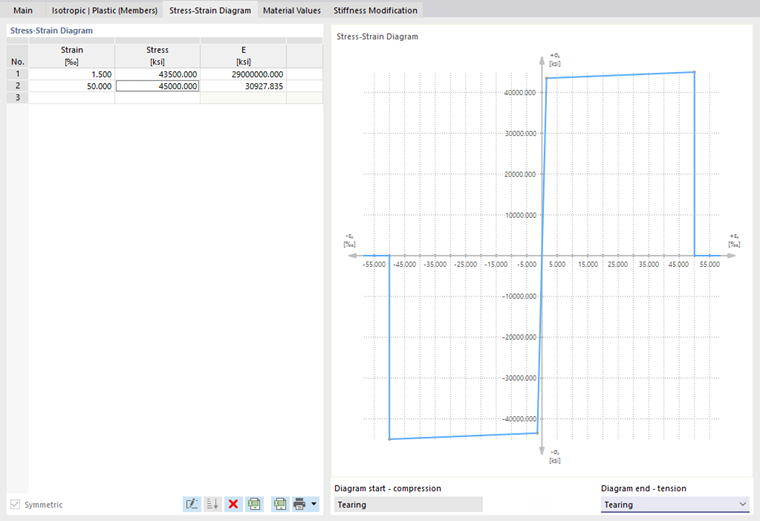
Define a point for the stress-strain relation in each row. You can choose how the diagram should continue after the last definition point in the 'Diagram End' list below the diagram:
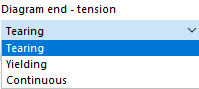
With 'Tearing,' the stress jumps back to zero after the last definition point. 'Flowing' means the stress remains constant with increasing strain. 'Continuous' means the curve continues with the slope of the last segment.
Isotropic Plastic (Surfaces/Volumes)
Selecting Isotropic | Plastic (Surfaces/Volumes) in the 'Material Model' dropdown list activates the register for entering the non-linear material parameters.
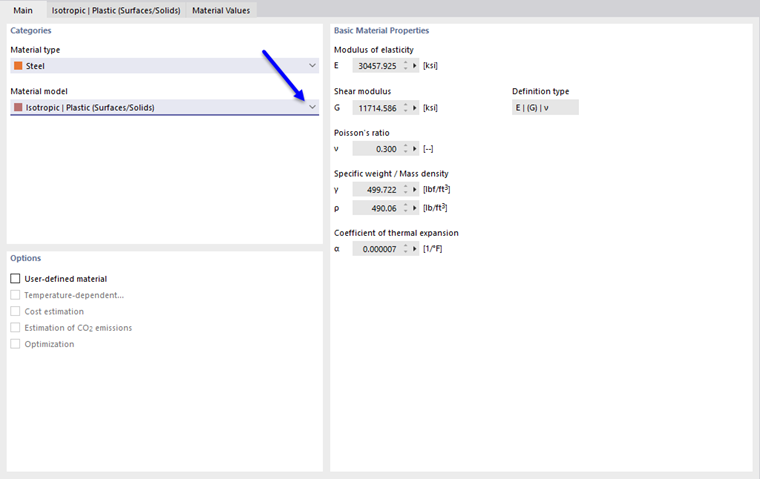
First, choose the 'Stress Failure Hypothesis'. The following hypotheses are available:
- von Mises (Distortion Energy Hypothesis)
- Tresca (Shear Stress Hypothesis)
- Drucker-Prager
- Mohr-Coulomb
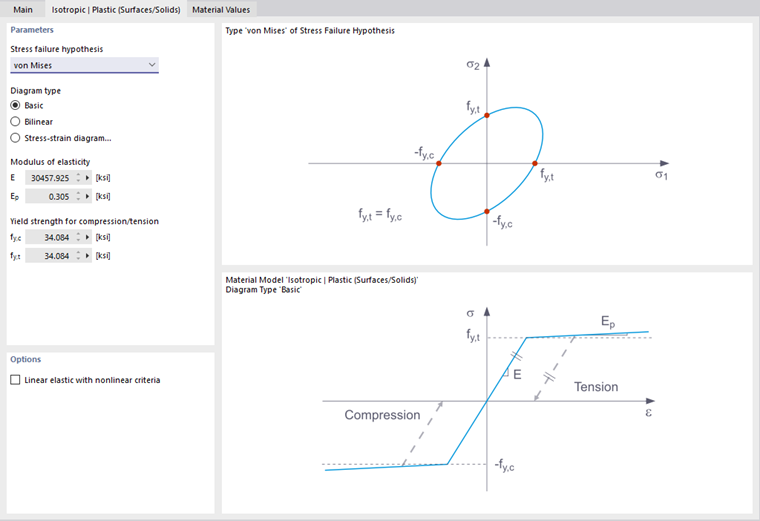
If von Mises is selected, the following stresses are used in the stress-strain diagram:
- Surfaces
- Volumes
According to the Tresca hypothesis, the following stresses are used:
- Surfaces
- Volumes
According to the Drucker-Prager hypothesis, this stress is used for surfaces and volumes:
|
σc |
Limit stress for compression |
|
σt |
Limit stress for tension |
According to the Mohr-Coulomb hypothesis, the following stress is used for surfaces and volumes:
Isotropic Non-linear Elastic (Members)
The operation is similar to the material model Isotropic Plastic (Members). However, no plastic strain remains after unloading in contrast to the said model.
Isotropic Non-linear Elastic (Surfaces/Volumes)
The operation is similar to the material model Isotropic Plastic (Surfaces/Volumes). However, no plastic strain remains after unloading in contrast to the said model.
Isotropic Damage (Surfaces/Volumes)
Unlike other material models, the stress-strain diagram for this material model is not antisymmetric to the origin. Hence, the behavior of, for example, steel fiber concrete can be modeled with this material model. Detailed information on modeling steel fiber concrete can be found in the technical article Material Properties of Steel Fiber Concrete.
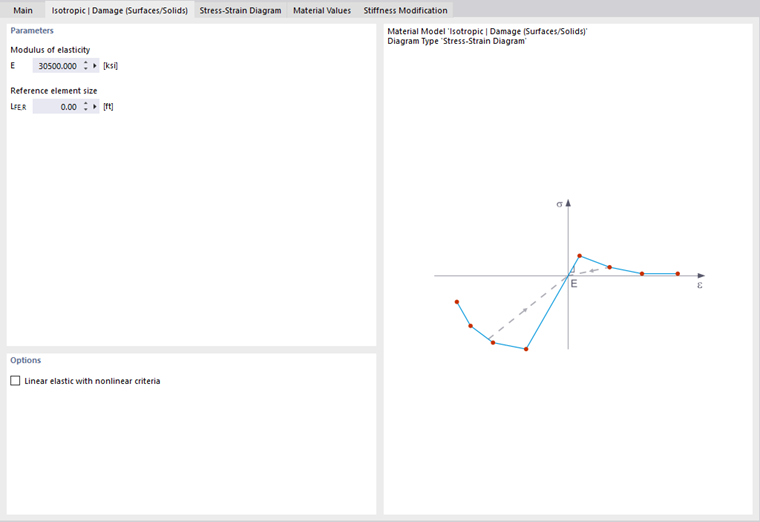
The isotropic stiffness is reduced with a scalar damage parameter. This damage parameter is determined by the course of the stress defined in the diagram. The direction of the principal stresses is not considered; instead, the damage occurs in the direction of the equivalent strain that also captures the third direction perpendicular to the plane. The tension and compression areas of the stress tensor are treated separately. Different damage parameters apply to each.
The 'Reference Element Size' controls how the strain in the crack area is scaled to the element length. No scaling occurs with the set value of zero. Thus, the material behavior of steel fiber concrete is realistically depicted.
Theoretical background on the 'Isotropic Damage' material model can be found in the technical article Non-linear Material Model Damage.
Orthotropic Plastic (Surfaces) / Orthotropic Plastic (Volumes)
The material model according to Tsai-Wu combines plastic and orthotropic properties. This allows for special modeling of materials with anisotropic characteristics, such as fiber-reinforced plastics or wood.
When the material yields, the stresses remain constant. Redistribution depends on the stiffnesses present in the individual directions.
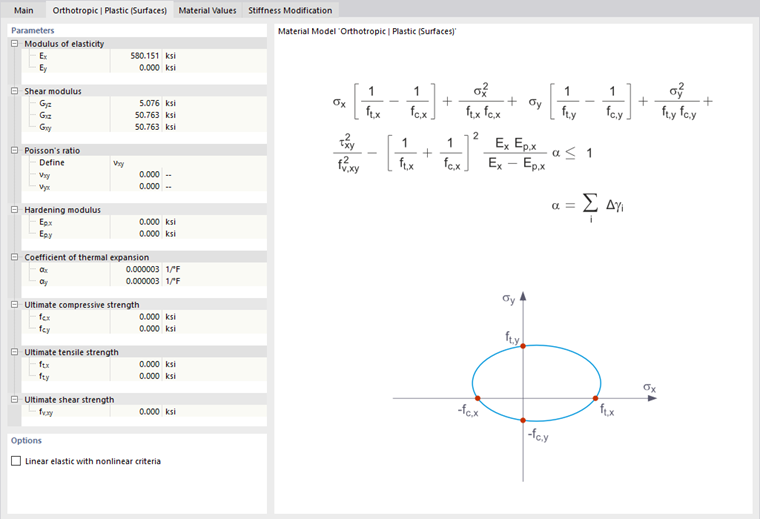
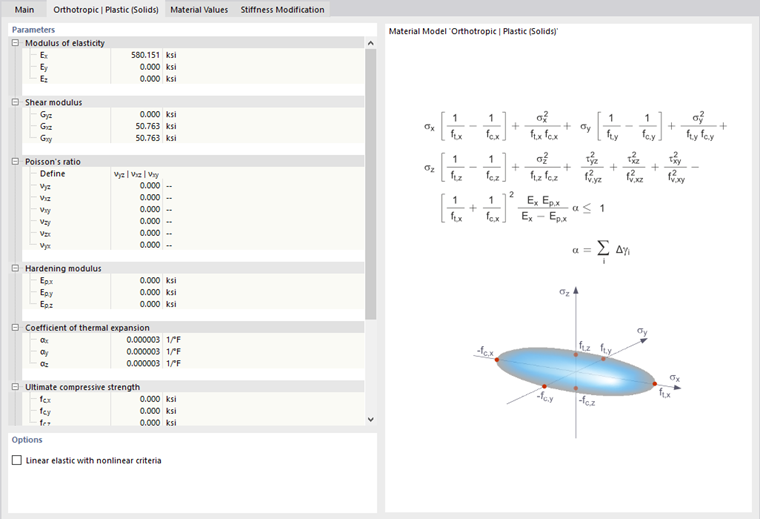
The elastic range corresponds to the material model Orthotropic Linear Elastic (Volumes). For the plastic range, the following yield condition according to Tsai-Wu applies:
- Surfaces
- Volumes
All strengths must be defined positively.
The yield condition can be imagined as an ellipsoidal surface in the six-dimensional stress space. If one of the three stress components is set as a constant value, the surface can be projected onto a three-dimensional stress space.
If the value for fy(σ) according to the equation Tsai-Wu, Plane Stress State is less than 1, the stresses are in the elastic range. The plastic range is reached as soon as fy(σ) = 1. Values greater than 1 are inadmissible. The model behaves ideally plastic, meaning there is no hardening.
Orthotropic Plastic Weld (Surfaces)
This material model is used in analyses with the Steel Joints Add-on to accurately represent the behavior of welds according to standards. Only stresses corresponding to the stress components σ⊥, τ⊥, and τ|| of the weld occur in the substitute surface. In the other stress directions, the stiffness of the substitute surface approaches zero.

In the 'Orthotropic | Plastic | Weld (Surfaces)' register, you can define the parameters for considering the plastic strain hardening in welds, such as the limit values fekv and fx for the stress check according to the "directional method" based on EN 1993-1-8 [1] for welds, modified to include a plastic component (see also the technical article Verification of Fillet Welds).
Concrete
For the material type 'Concrete,' non-linear material models such as 'Anisotropic | Damage' and 'Isotropic | Damage (Surfaces/Volumes)' are available.
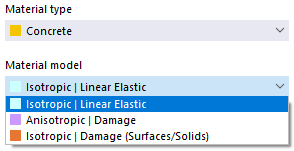
These material models are described in the chapter Anisotropic | Damage of the Concrete Manual or in the section above Isotropic Damage.
Masonry
If the Masonry Design Add-on Masonry Design is activated (license required) in the Model Basic Settings, non-linear material models 'Isotropic | Masonry | Plastic (Surfaces)' and 'Orthotropic | Masonry | Plastic (Surfaces)' are available for the material type 'Masonry'.
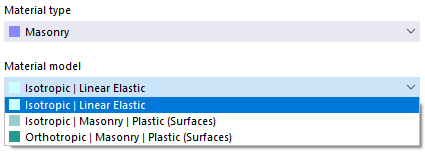
Both material models are described in the chapter Materials of the Masonry Manual.