


The Connect Skew Lines and Connect Skew Members functions in the Tools → Modify Lines and Tools → Modify Members menus, respectively, allow you to create connections between lines or members that are spatially separated. You can also use the
 or
or
 button in the CAD toolbar (see the image Modeling Tools). This allows you to link objects in the structural model that have no geometric connection after the import of a CAD file (for example, rafters on the purlins of a roof truss). The location of the objects then does not need to be adjusted.
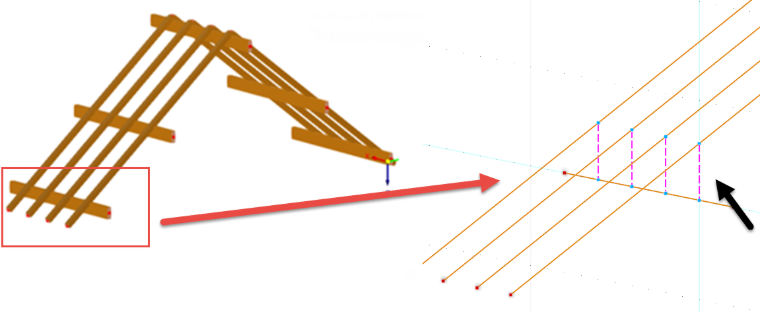
You do not need to select the lines or members before activating the function.
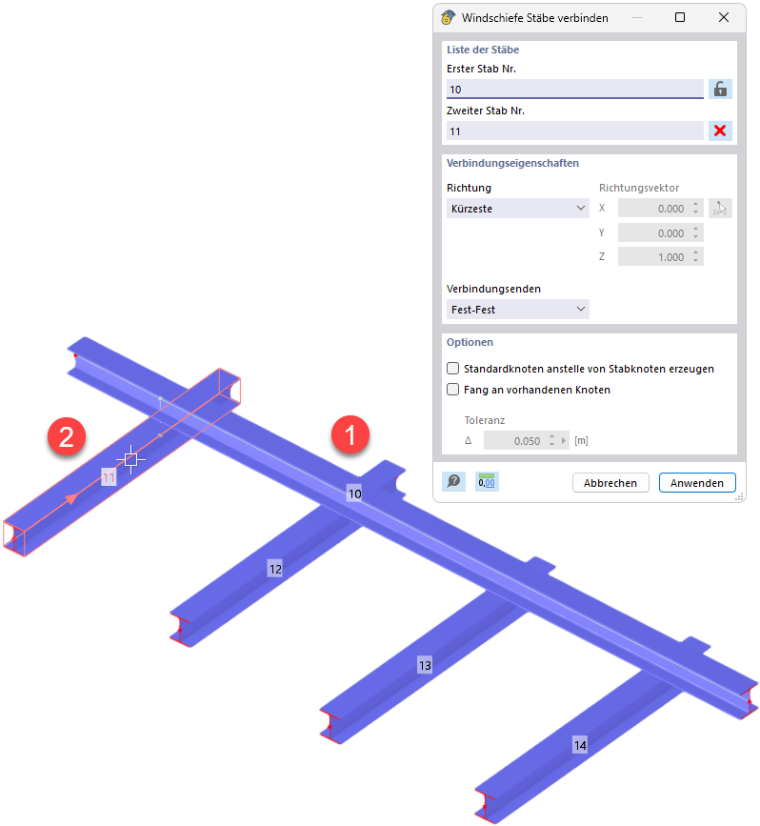
Select the lines or members successively in the work window by clicking them with the mouse. You can also enter the object numbers. When you move the mouse pointer over the second object, you will see the coupling in the preview. Clicking the object creates the coupling.
Connecting Multiple Objects
If you want to connect multiple lines/members to an object, select the first object and then click the
 button: The object will be locked. You can now click successively on all the lines or members that you want to connect to the object. In the image Connecting Skew Members, these would be Members 11 through 14, each of which can be connected to the member above it (Member 10) using couplings.
Connection Properties
Select from the list the direction in which the coupling should be established:
- Shortest: The program creates a perpendicular line between the centers of the two objects.
- Parallel to global X/Y/Z: The coupling is made in the direction of an axis of the XYZ coordinate system.
- User-defined: Specify the direction vector or define it graphically using the
 button.
Using the options in the Connection Ends list, you can control how the lines or members are connected:
- Fixed-Fixed
- Fixed-Hinged
- Hinged-Hinged
Options
When creating couplings on the original objects, nodes of the Node on Line or Node on Member type are created by default, so that the objects remain undivided. If you want the original objects to be split, activate the Create standard nodes instead of line/member nodes check box.
The Snap to existing nodes option allows for the coupling to be placed on nodes that already exist on the objects.