


The short printout reports are managed in a separate manager. You can access this Manager for Short Printout Reports in one of the following ways:
- Option Edit Short Printout Report in the shortcut menu of a short report in the Navigator – Data
- Feature Edit Printout Report in the printout report menu Edit
- Button
 in the printout report toolbar
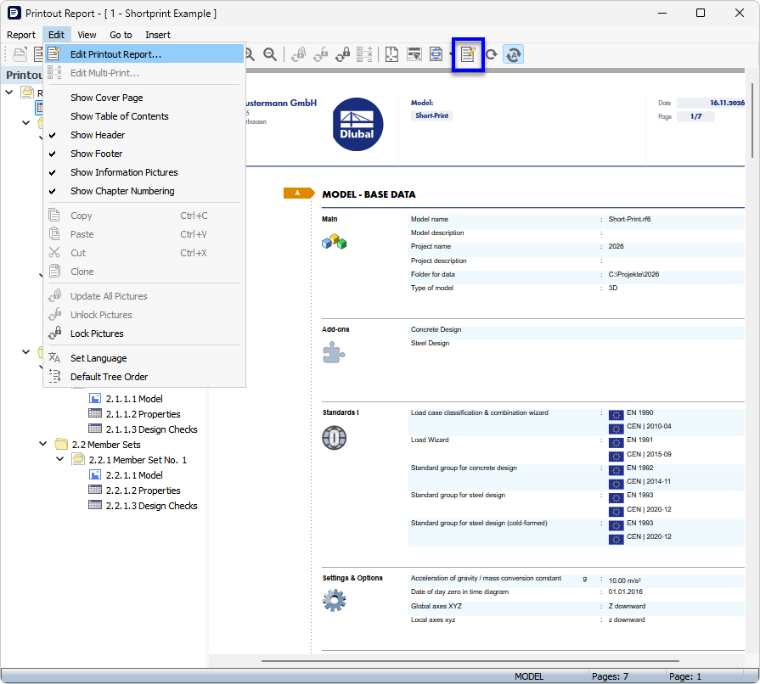
The 'Manager for Short Printout Reports' dialog box appears with the list of the available short reports.
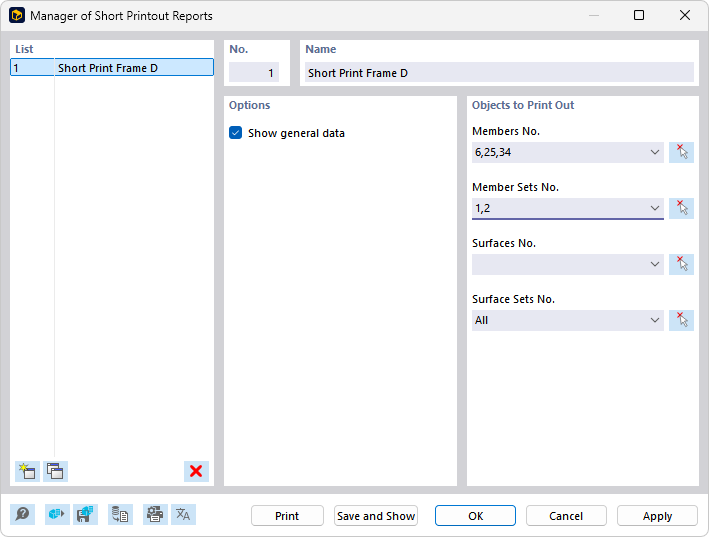
List
In the list, select the printout report that you want to adapt. In the sections on the right, you can then define the items of the short report.
If you use several short reports, you should assign suitable designations for the individual printout reports in the 'Name' section.
To create a new printout report, use the buttons
 or
 at the end of the list.
You can import the report items from a template or save the current selection as a template. These features are described in the chapter Printout Report Template.
Printout Report Items
As for a detailed printout report, you can define which objects the short printout report should include. However, the selection is much simpler.
Options
The 'Show Base Data' check box controls whether important calculation and design specifications are documented in the report on one page. These include, among others:
- Model and project name
- Add-ons used
- Relevant standards
- Axis settings
- Tolerances
Objects to Be Printed
Enter the numbers of the objects whose results you need in short form. The documentation is possible for the following object types:
- Members
- Member sets
- Surfaces
- Surface sets
Using the button
 , you can select the objects graphically in the work window.
Buttons
The buttons at the bottom of the dialog box have the same features as for a detailed printout report. They are described in the chapter Manager für Ausdruckprotokolle.