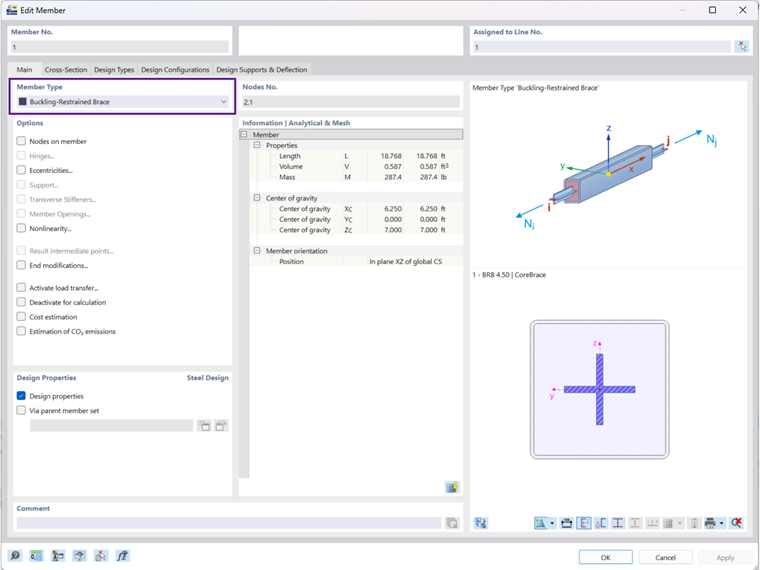
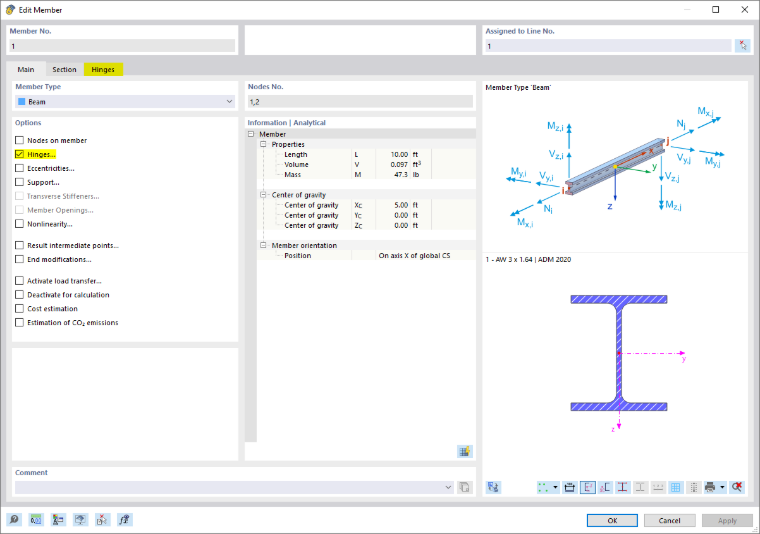
The Main tab manages the elementary member parameters. If you tick a check box in the 'Options' section, another dialog tab is usually added. There you can define the details.
Member Type
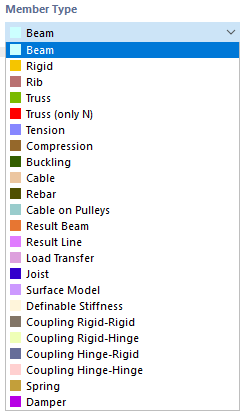
The member type controls in which way internal forces can be recorded or which properties are assumed for the member. Various member types are available for selection in the list.
Beam Member
A beam is a rigid member in terms of bending stiffness that can transfer all internal forces. A beam member has no hinges at its member ends. This member type can be loaded by all load types.
Rigid Member
A rigid member couples the displacements of two nodes by means of a rigid connection. It therefore essentially corresponds to a coupling. This allows you to define members with very high stiffness while taking hinges into account, which can also have spring constants and nonlinearities. Hardly any numerical problems occur because the stiffnesses are adapted to the system.
Internal forces are output for rigid members if you activate Results for couplings in the Navigator - Results at the bottom in the 'Members' category.
The following stiffnesses are assumed for rigid members:
| Longitudinal stiffness E · A | 1013 · ℓ [SI unit] with ℓ = member length |
| Torsional rigidity G · IT | 1013 · ℓ [SI unit] |
| Bending stiffness E · I | 1013 · ℓ3 [SI unit] |
| Shear stiffness GAy / GAz (if activated) | 1016 · ℓ3 [SI unit] |
- banner.text
Rib Member
Ribs can be used to model T-beams (downstand beams). For this member type, the eccentricities and effective plate widths are taken into account in the FEM model.
Ribs are primarily suitable for reinforced concrete members because the rib internal forces and cross-sections are included in the concrete design. A steel plate with a welded-on "rib" should be modeled as a surface with an eccentrically connected member.
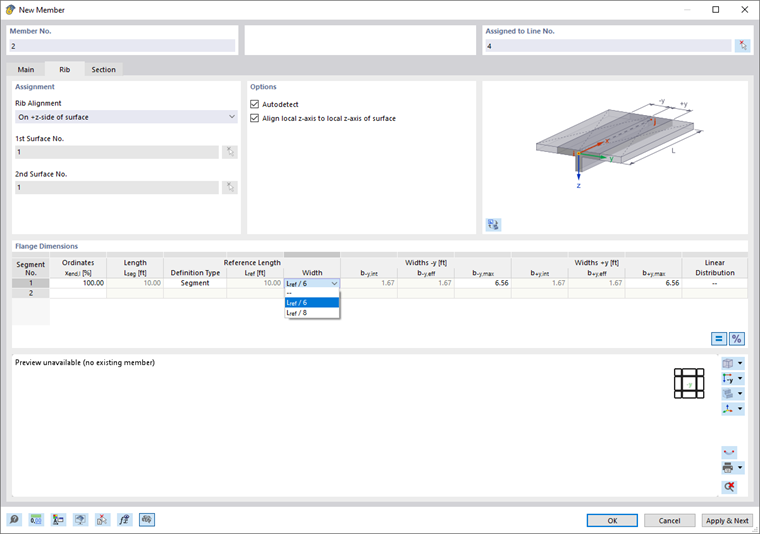
The list offers several options for the 'Rib arrangement'.

As a rule, a rib is an eccentrically arranged member. The eccentricity is automatically determined from half the surface thickness and half the member height. However, it can also be defined manually. The eccentricity of the rib increases the stiffness of the model. With a centric arrangement, the centroidal axis of the rib lies in the middle of the surface.
The effective widths of the rib are to be defined in the 'Flange dimensions' section for the left and right sides. In most cases, the 'Find automatically' setting can be retained, with which the program determines the two surfaces. If more than two surfaces meet at the line of the rib member, the governing surfaces must be defined manually.
There are various options for entering the integration widths b-y,int and b+y,int (see image New Rib): The widths can be entered directly or determined automatically from the member length using the Lref / 6 and Lref / 8 options. They can also be determined according to the specifications of a standard, for example according to 'EC2' Section 5.3.2.1.
The by,int values define the width of the surface or the catchment area from which the internal forces are to be integrated. The by,eff values represent the cross-section width of the rib flange from the web center to the respective edge. By default, by,int and by,eff are set equal. However, you can define them separately after clicking the
 button.
If nodes of the 'Nodes on member' type have been defined, the rib can be defined section by section for the individual segments. If several segments are defined, the offset width ranges can be linearly connected to one another via the 'Linear distribution' table column in order to prevent large stiffness jumps in the rib member.
For 3D models, the effective widths have no influence on the stiffness, since the increased stiffness is taken into account by the eccentric member. However, the effective widths affect the distribution of the member and surface internal forces.
Truss Member
A truss member corresponds to a beam member with moment hinges at both ends. In addition, the rotation about the longitudinal axis is released at the member start by a hinge φx. For this member type, bending and torsional moments are output from the loads on the member.
Truss Member (Only N)
This type of truss member with the stiffness E ⋅ A is able to absorb axial forces in the form of tension and compression. Only nodal internal forces are output. The member has a linear internal force diagram unless a point load acts on the member. No moment diagram is output that could result from self-weight or a line load. However, the nodal forces are calculated from the member loads, which ensures the correct transfer.
- banner.text
Buckling-Restrained Brace
The buckling-restrained brace type enables the modeling of a member with a steel core (flat bar or cross-shaped cross-section) and a concrete-filled coating in a square or round hollow section. It is used particularly in the USA for the bracing of earthquake-endangered buildings.
- banner.text
Cable Member
A cable can only be stressed in tension. This allows cable chains to be modeled using an iterative calculation according to large deformation analysis taking longitudinal and transversal forces into account.
Cables are suitable for models in which large deformations with corresponding changes in the internal forces can occur. For simple guy wires such as for a canopy, tension members are quite sufficient.
Reinforcement Bar
This member type allows you to model mild steel reinforcement in the FE model of a reinforced concrete element. For example, discontinuity regions based on the truss analogy can be investigated (tie and compression strut for consoles, beams with openings).
The reinforcement bar has an automatic connection function to other elements such as members or surfaces if it is physically located within the element. Like the truss member (only N), a reinforcement bar has only a tangential stiffness. A nonlinear material behavior is currently not yet possible.
- banner.important
Cable at Pulleys
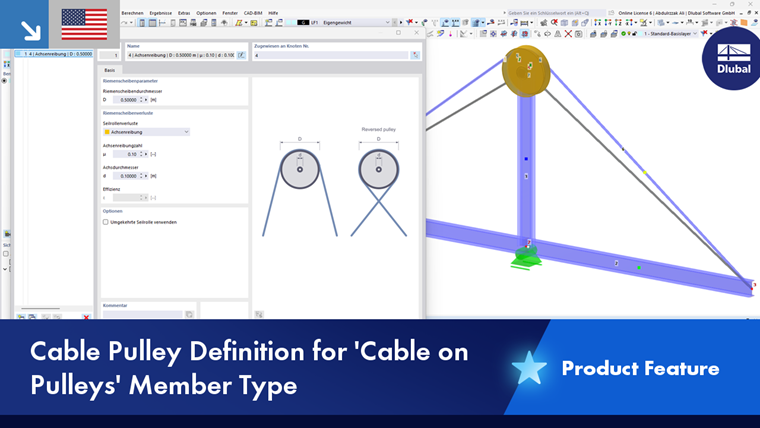
This cable member type also only absorbs tensile forces and is calculated according to cable theory (large deformation analysis). However, a cable member at pulleys can only be defined on a polyline that lies in one plane and has at least three nodes. This member type is suitable for flexible tensile elements whose axial forces are routed through the model via deflection points. An application example is a pulley system.
In contrast to a normal cable member, only a displacement in the longitudinal direction (ux) is possible at the inner nodes. Therefore, the member must not be loaded by member loads acting in the local y or z direction. Only displacements ux and axial forces N are taken into account.
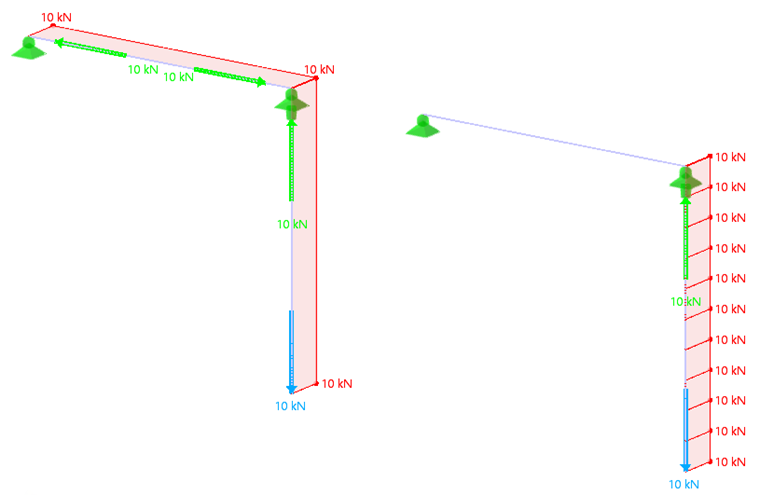
At the inner nodes of the polyline, it does not matter whether a nodal support is present or whether the member is connected to another structure: The overall system of the cable member is analyzed over the length of the polyline.
In the 'Cable pulleys' tab, you can define the further parameters such as deflection nodes and properties of the pulleys. Nodes, cable members, and rigid members are generated from these specifications.
- banner.tip
Result Beam
The result beam is suitable for integrating surface, solid, or member results in a fictitious member. For example, this allows you to read off the resulting shear forces of a surface for the masonry design.
The line of a result beam can be placed anywhere in the model. The result beam requires neither a support nor a connection to the model. However, a cross-section must be assigned in order to enable a design. No loads can be applied to a result beam.
- banner.text
Result Line
The result line is suitable for integrating surface, solid, or member results in a line. This line can be placed anywhere in the model.
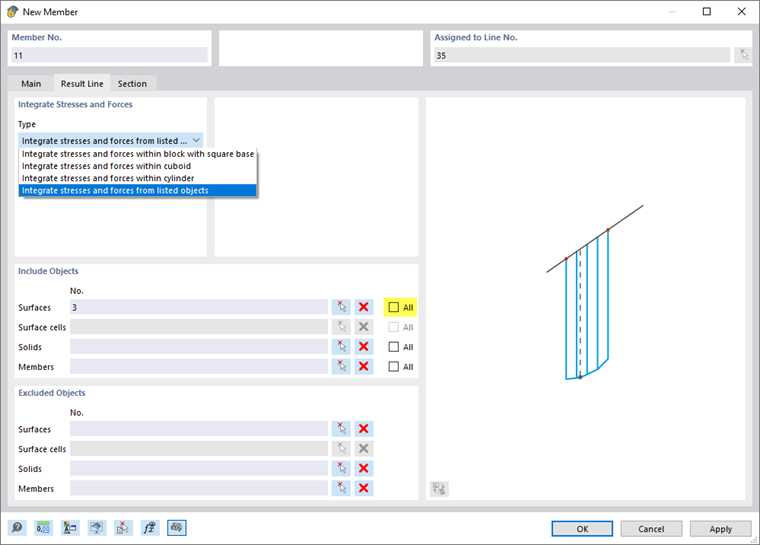
The principle corresponds to a result beam. However, you do not need to assign a cross-section. In the 'Cross-section' tab, you can read the length of the line and, if necessary, rotate the line for the result display; it has no further function.
Load Transfer
This member type allows you to apply loads to objects that are connected to the member at end or intermediate nodes. The member itself has no stiffness. You can define the criteria for the load transfer in a new tab.
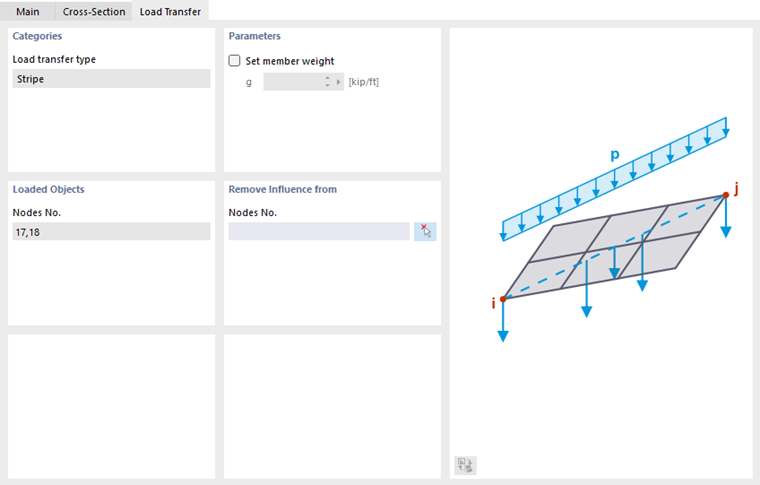
The load transfer is currently carried out using the strip method. The load on the load transfer member - member load or nodal load of the type force, moment, or mass - is transferred proportionally to the nearest common structural objects. These are, for example, supported nodes, members, nodes of surfaces, or supported lines.
If the self-weight of the member is to be taken into account, you can define the member weight in the 'Parameters' section.
In the 'Loaded objects' section, the numbers of the nodes at which the member load is transferred to the adjacent objects are specified. If not all of these nodes are relevant, you can exclude certain nodes in the 'Without effect on' section.
Virtual Joist
This member type makes it possible to apply the cross-section properties for Open Web Steel Joists that the Steel Joist Institute has stored in so-called "Virtual Joist" tables. These virtual joist cross-sections represent equivalent wide-flange beams that come very close to the joist chord surface, the effective moment of inertia, and the weight. The joist is thus replaced by a member with a virtual cross-section. This allows complex load-bearing units such as a truss girder to be simulated in the overall system.
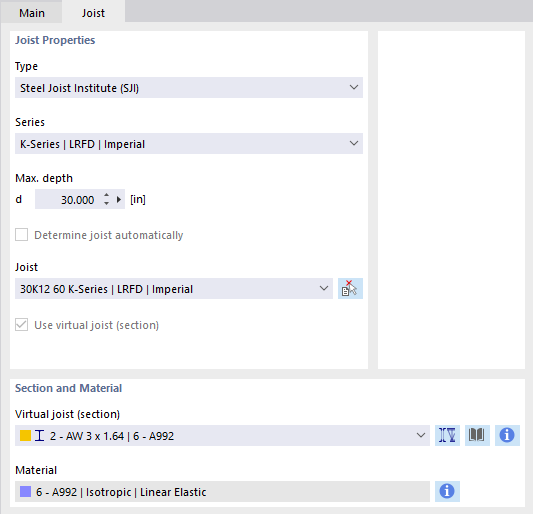
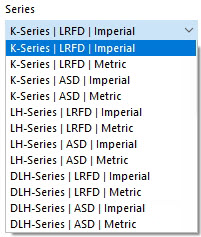
Select the 'Series' of the virtual joist in the list.
In the 'Virtual joist' list, you can then define the exact type.
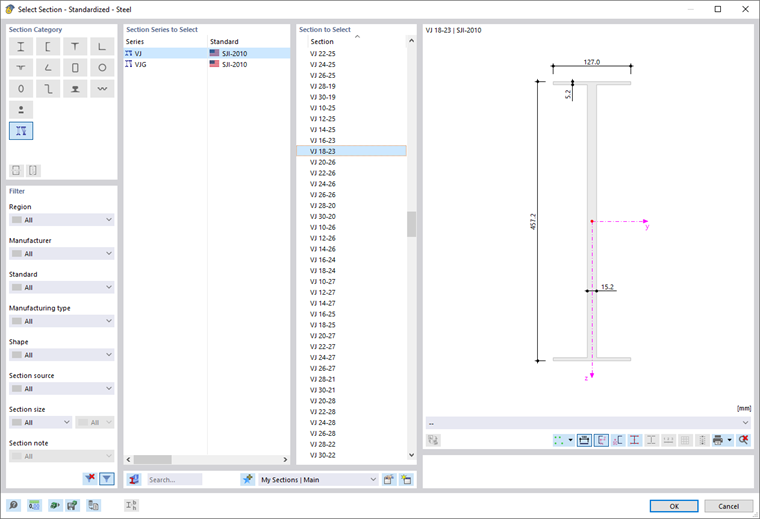
The
 button in the 'Cross-section and material' section allows you to import the virtual joist from the cross-section library.
Composite Beam
This member type allows you to model individual partial cross-sections as separate members and connect them to each other by rigid couplings. The composite behavior can be modeled as shear-rigid, shear-soft, or flexible. A corresponding fastener library is planned for a future extension.
The definition of the composite cross-section is currently only possible in RSECTION (see chapter Main of the RSECTION manual). The composite cross-sections already contained in the cross-section library will be transferred to the new concept at a later point in time and will thus also be usable. A uniform workflow is also planned for the future for the design of the individual partial cross-sections. However, the partial cross-sections can already be designed in the corresponding design add-ons.
Surface Model
This member type is primarily suitable for modeling castellated beams or cross-section reductions such as openings for utility lines in the member model. The member is converted into a surface model in which the member openings are arranged according to user specifications. However, the member is retained. The following prerequisites must be met:
- The cross-section is a standardized or parametrized thin-walled cross-section with a web.
- The material of the cross-section is based on an isotropic linear elastic material model.
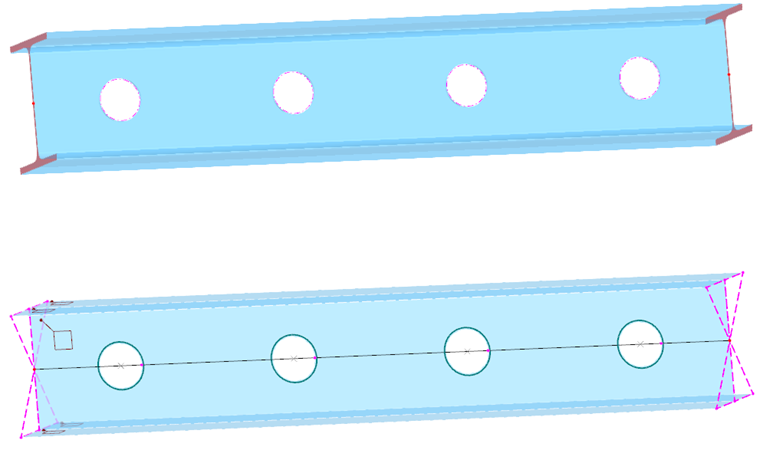
For the 'Surface model' member type, the member exists both as a member and as a surface object. The geometric properties are identical; both models have the same centroid. The display is controlled in the Navigator - Display via the entry Model → Basic objects → Members → Surface model or via the
 button in the toolbar.
The FE mesh of the surface model is generated automatically; it cannot currently be influenced. The surface model is used in the static analysis. Both the member results are available for evaluation (as for a result beam, in which the stresses of the member partial surfaces are integrated into member internal forces) as well as the surface results. The control can also be carried out here via the Navigator - Display or the
button.
The design of a surface model member in the add-ons is carried out with the member internal forces and the member cross-section.
As can be seen in the image above, several rigid members are created at the member ends of a surface model member. They connect the surface model to the end nodes of the adjacent members. This ensures the correct transfer of the internal forces to the 1D objects. If several surface model members adjoin each other, these coupling members are generated for each member.
- banner.text
Coupling
A coupling member is a virtual, very stiff member with rigid or hinged member ends. Four options are available for coupling the degrees of freedom of the start and end nodes as 'Fixed' or via a 'Hinge'. Couplings allow you to model special situations for force and moment transfers. The axial and shear forces or torsional and bending moments are transferred directly from node to node.
- banner.text
Spring
A spring member makes it possible to model linear as well as nonlinear spring properties with definable effective ranges. For a spring member, you only need to define the member length Lz in the 'Cross-section' tab, no cross-section: The stiffness of the member results from the spring parameters that you define in the 'New member spring' dialog (see chapter Member Springs).
Dashpot
A dashpot essentially corresponds to a spring member with the additional property 'Damping coefficient'. This member type extends the possibilities for dynamic analyses according to the time history analysis.

As with a spring member, you only need to define the member length Lz in the 'Cross-section' tab, no cross-section. The stiffness of the member results from the spring parameters that you define in the 'New member spring' dialog (see chapter Member Springs). You can control the damping properties via the damping coefficient X.
- banner.text
Nodes on Member
With one or more nodes on the member, you can divide the member into segments without splitting the member (see chapter Nodes).
Hinges
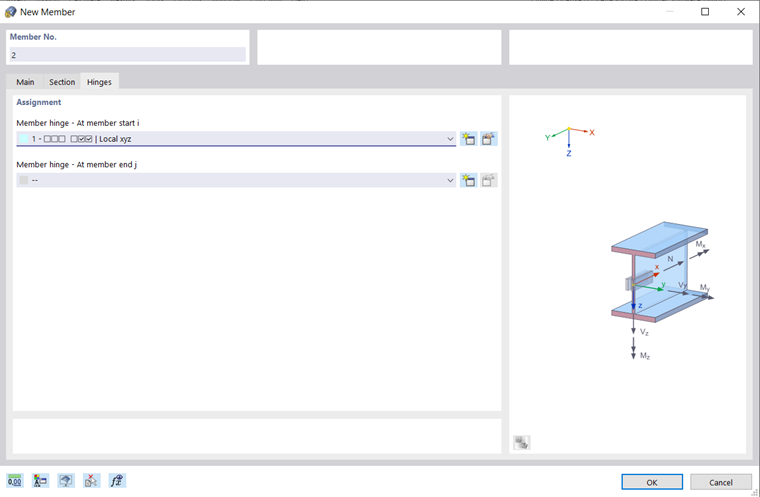
You can arrange hinges on a member to control the transfer of internal forces at the end nodes (see chapter Member Hinges). For certain member types, the input is locked because internal hinges are already present. You can assign hinges separately to the 'Member start i' and the 'Member end j'.
Eccentricities
Eccentricities offer the possibility to connect the member eccentrically at the end nodes (see chapter Member Eccentricities). You can assign eccentricities separately to the 'Member start i' and the 'Member end j'.
Supports
You can assign a support to the member that is effective over its entire length. The degrees of freedom and spring stiffnesses are to be defined at the support conditions (see chapter Member Supports).
Transverse Stiffeners
Transverse stiffeners on the member have an influence on the warping stiffness of the member. They affect the calculation with torsional warping taking seven degrees of freedom into account (see chapter Member Transverse Stiffeners).
Member Openings
Member openings affect the cross-section values and the internal force diagram. They are relevant for the 'Surface model' member type. Chapter Member Openings describes how you can define the type and position of the openings.
Nonlinearity
You can assign a nonlinearity to the member. The nonlinear properties are to be defined as member nonlinearities (see chapter Member Nonlinearities).
Intermediate Result Points
With intermediate result points, you can control the table output of the results along the member. The division points are to be defined in the 'New member intermediate result point' dialog (see chapter Member Intermediate Result Points).
- banner.text
End Modifications
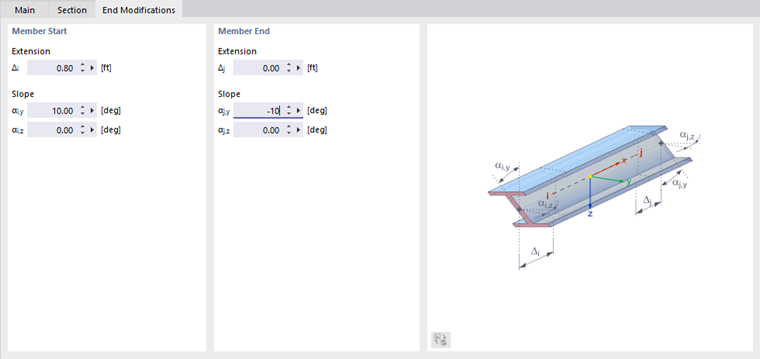
With end modifications, you can adjust the geometry of the member at its ends graphically. This allows you to prepare protrusions, shortenings, or chamfers for the rendered display.
- banner.text
Deactivate for Calculation
If you tick this check box, the member including loading is not taken into account in the calculation. This allows you to investigate how the load-bearing behavior of the model changes when certain members are not effective. The members do not need to be deleted; the loads are also retained.
Cost Estimation
The cost estimation is usually carried out with the costs of the material assigned to the members of a cross-section (see chapter Materials). If specific parameters are to apply for a member, you can define the unit costs and units separately in the 'Cost estimation' tab. The principle corresponds to the procedure described for Cross-Sections.
CO2 Emission Estimation
The CO2 emission estimation is also usually based on the material of the cross-section. However, you can define the unit emissions and units specifically for each member in the 'CO2 emission estimation' tab. The principle is described in chapter Cross-Sections for the emissions of certain cross-sections.